
















Track SMS campaign clicks, website visits and sales
Send tracked SMS links through the TNZ Dashboard. Review recipient clicks and use campaign tags to measure website visits and sales in Google Analytics.
Updated
You've sent an SMS campaign promoting your latest offer. But how do you know whether it worked?
Standard SMS delivery reports tell you whether messages were delivered, but not whether recipients clicked your link, visited your website or made a purchase. With TNZ SMS Link Tracking, you can see which recipients clicked, and optionally use Google Analytics to measure campaign traffic and sales.
This guide shows you how to send a tracked SMS Broadcast through the TNZ Dashboard and review the results, using a fictional spring sale as an example.
What can you track?
SMS link clicks
See which recipients clicked their unique SMS links and when. You do not need Google Analytics. Export click data for follow-up in your CRM.
Website visits
Add campaign tags to your link to identify visits from SMS in Google Analytics 4 (GA4). This requires GA4 on your website.
Purchases and revenue
If your website sends ecommerce purchase events to GA4, review sales attributed to your SMS campaign. To match individual orders to customers, you must configure your website or CRM.
1. Build your campaign link
Start with the webpage you want recipients to visit. For our spring sale, the link is:
https://www.yourstore.co.nz/spring-sale
If you only need to see who clicked: Use this link inside TNZ's [[Link:...]] command in step 3. TNZ records clicks without tracking tags or customer references.
Optional: Track website visits in Google Analytics
If your website uses GA4, add UTM campaign tags to help identify visits from your SMS promotion:
https://www.yourstore.co.nz/spring-sale?utm_source=tnz&utm_medium=sms&utm_campaign=spring-sale
utm_source=tnzsets TNZ as the campaign source.utm_medium=smsidentifies SMS as the medium. Use lowercasesmsconsistently.utm_campaign=spring-salenames this campaign so you can compare its results with others.
If the page address already contains a question mark, add the tracking tags with & instead of another ?.
Optional: Add a customer reference
To pass a customer reference to your website or CRM, add the Custom1 field:
https://www.yourstore.co.nz/spring-sale?utm_source=tnz&utm_medium=sms&utm_campaign=spring-sale&cid=[[Custom1]]
Adding cid=[[Custom1]] includes each recipient's customer reference in the link. Step 5 explains how your store or CRM can use it to match orders.
Protect customer information: Do not include names, mobile numbers or email addresses in tracking links. Analytics and other website tools can collect URLs. Use a reference that does not reveal personal information.
Read Google's guidance on keeping personal information out of Analytics.
2. Prepare your contact list
Create a spreadsheet of the people you want to message. The example uses these columns:
- Destination: the recipient's mobile number. This is the number TNZ will send to.
- Attention (optional): the recipient's name, for a personalised greeting.
- Custom1 (optional): a customer reference from your store or CRM, if you use
[[Custom1]]in the campaign link.

You can also use Address Book contacts that contain the fields you need. See Adding TNZ Dashboard Address Book Contacts.
3. Create and send your SMS Broadcast
- Log in to the TNZ Dashboard.
- Select New Message | Send SMS Broadcast.
- Load your contact list.
- Enter your SMS message with the website address inside the
[[Link:...]]command, as shown below.

Example message with basic TNZ click tracking:
Hi [[Attention]], our spring sale starts today. 30% off bedding for our regular customers: [[Link:https://www.yourstore.co.nz/spring-sale]]
If you do not use Attention, remove Hi [[Attention]], from the example.
If you added GA4 campaign tags in step 1, use that longer address inside the same [[Link:...]] command instead.
Example message with GA4 tags and an optional customer reference:
Hi [[Attention]], our spring sale starts today. 30% off bedding for our regular customers: [[Link:https://www.yourstore.co.nz/spring-sale?utm_source=tnz&utm_medium=sms&utm_campaign=spring-sale&cid=[[Custom1]]]]
If you do not supply customer references, omit &cid=[[Custom1]] from the link. Keep the final ]] that closes the Link command.
Example of what the recipient receives:
Hi Sarah, our spring sale starts today. 30% off bedding for our regular customers: tnz.nz/A1B2C3
TNZ replaces the substitution fields with each contact's values and creates a unique short link for each recipient. If you use [[Custom1]] inside [[Link:...]], keep the nested brackets exactly as shown.
For more about the command, see SMS URL Shortener and Short Links.
- If you want to schedule the broadcast, set Sending Date/Time. The sending time uses your computer's timezone.
- Review the recipients, message and sending time.
- Select Submit when you are ready to send.
4. See who clicked your SMS link
After sending your campaign, open the TNZ Dashboard and select View Messages | Message Link Tracking.
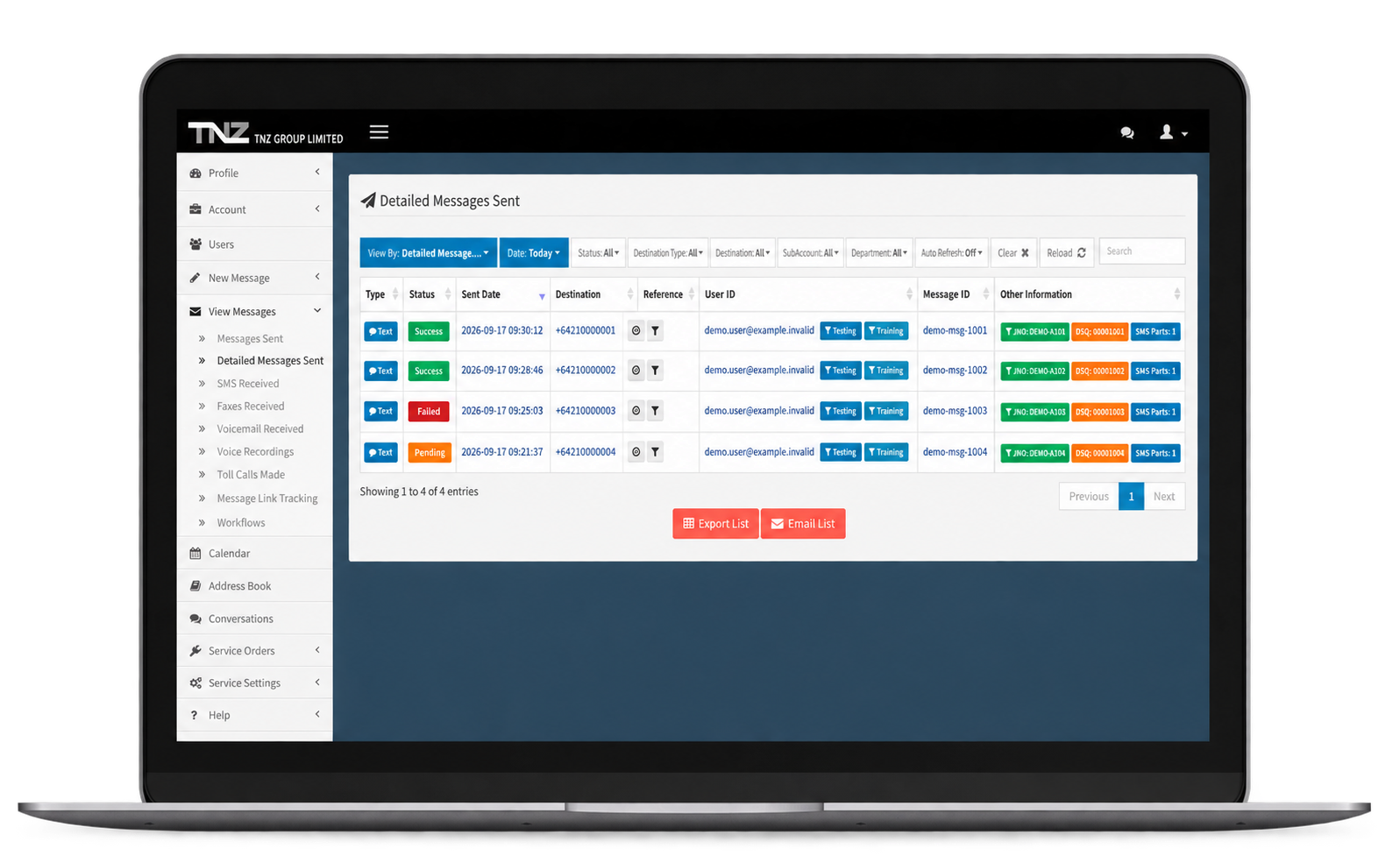
The link-tracking report shows the mobile number, time and device for each recorded click.
Select Export List to download a CSV of click data for your CRM or a marketing platform such as Klaviyo.
Keep a copy of your results: TNZ keeps click data for three months. If you need the information later, export the report after each campaign.
5. Optional: Review website visits and sales in Google Analytics
If you added UTM tags and your website uses Google Analytics 4, follow these steps to review campaign traffic.
- Open Google Analytics 4.
- Select Reports | Acquisition | Traffic acquisition.
- Filter for Session medium with the value
sms. - Use Session campaign to identify your campaign, such as
spring-sale.
See Google's Traffic acquisition report guide for report options.
See purchases and revenue
If your website sends purchase events to GA4, you can review purchases and revenue attributed to your campaign. UTM tags alone do not record sales. Ask your website administrator or ecommerce provider about configuring ecommerce tracking in GA4.
Match individual orders to customer references
If you included cid=[[Custom1]] in the campaign link, your store or CRM must capture the resulting cid value and save it with an order. You can then match that reference with the Custom1 value in your contact list, if your system supports it.
Ask your website administrator or CRM provider to configure order matching. TNZ click reports and GA4 campaign tags do not do this automatically.
How the reports work together
TNZ shows who clicked the link. GA4 reports the website traffic and revenue attributed to your campaign. The figures may differ because a click is not the same as a recorded website session or purchase.
What to know about SMS link tracking
Clicks and message reads
TNZ reports link clicks. SMS does not tell you whether someone read the message.
Automated link previews
Some phones and apps preview links automatically. TNZ filters bots and link previews using known addresses and browser signatures.
Forwarded messages
TNZ still associates a forwarded link with the original recipient. If Sarah forwards her message and a friend clicks, the report records the click against Sarah.
Custom link domains
You can use your own domain for short links, such as yourbrand.nz/A1B2C3. Custom domains cost $50 a month with unlimited links.
Tell recipients about tracking
Explain in your privacy policy that you track links in your messages.
Need help with your campaign?
Contact TNZ for help with SMS link tracking or a custom link domain.