Why choose TNZ

Built for NZ businesses that need smarter communication.

One platform for Email, SMS, Voice and Fax, backed by real local support.

TNZ brings SMS, email, voice and virtual fax into one platform, with local support when you need it. Explore SMS appointment reminders and virtual fax for healthcare, payment reminders and application updates for finance, SMS offers, collection notices and delivery updates for retail, or SMS, email and voice APIs, server alerts and wholesale services. Each industry guide shows what to send, how to use the service and examples from named TNZ customers.

START YOUR FREE TRIAL → Talk to our team

What makes TNZ different

TNZ fits around the systems you already use. Connect a calendar or CRM to automate messages in the background, or use the dashboard to send messages, manage contacts and coordinate work across your organisation.

Choose the setup that suits your team without having to adopt every service at once.

How TNZ works

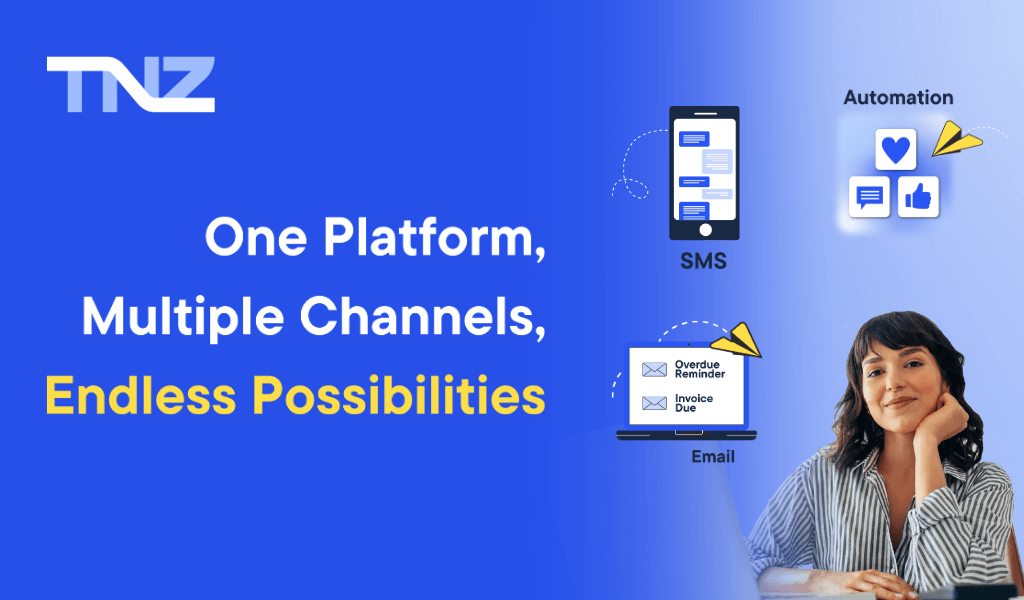
TNZ brings SMS, email, voice, fax and instant messaging into one platform. Send reminders from the dashboard, trigger them from a calendar or let your development team build an automated workflow.

Developers have access to APIs and webhooks, while other team members can work entirely through the dashboard.

Choose how you send

Use TNZ from your browser without installing software. The dashboard lets you send one-off messages, create templates, view replies and manage communication in one place.

If your team works from a CRM or internal system, connect it through the unified API. This can handle appointment reminders, emergency alerts and system notifications without anyone opening the dashboard.

Start with the dashboard or Email-to-SMS, connect an app through our integrations, or use the developer documentation to build with the API. You can add automation and new integrations later.

Build workflows with triggers and automation

A workflow can send an SMS when an email is not opened, or trigger a reminder from a calendar event or CRM field. Many of these workflows do not require a developer.

Use conditional rules to:

  • Trigger a voice call if an SMS goes unanswered
  • Schedule reminders automatically based on Outlook or Google Calendar entries
  • Log replies back into your CRM for tracking

Set workflows up visually, or use API calls and webhooks when you need more control.

For technical and non-technical teams

Frontline staff, administrators and IT teams can all use TNZ without working in the same way.

Admins and coordinators can manage communication through the dashboard. Developers can automate messages, pull reports and build integrations through the REST API.

Manage communication from the dashboard

The TNZ dashboard shows your communication in one place. Create templates, manage contacts, schedule messages and check delivery across each channel.

You can see replies, email opens and bounced messages without moving between separate tools.

Staff get a clear view of current and past messages without needing access to the technical setup behind them.

Use only what you need

You don't have to use everything at once. Start with SMS or email. Stay there if that's all you need. Or expand into multi-channel communication as your needs change.

Some clients use only the Email-to-SMS gateway. Others manage thousands of automated interactions across several departments. You can add services as your requirements change.

Tools for different teams

Marketing, development and operations teams can each use the same TNZ account in the way that suits their work.

For marketers and business owners

Use the dashboard and no-code integrations such as Zapier and HubSpot to manage campaigns, automate reminders and track results without technical help.

For developers and IT leaders

Integrate SMS, email, voice and fax through one REST API, with documentation, SDKs and webhook support.

For operations and response teams

Send urgent alerts through local telecommunications infrastructure. Channel fallback rules and audit trails help teams track each delivery attempt.

Eight reasons businesses choose TNZ

One platform

SMS, email, voice, fax and instant messaging share one login, one API and one bill. Staff do not need to switch between separate systems or reconcile several reports.

One API

The REST API covers every TNZ service, so developers do not have to integrate and authenticate each channel separately.

Automation and fallback rules

Use triggers and fallback rules such as "send an SMS if the email is not opened" without adding third-party software or custom code.

Local infrastructure and carrier routing

Data is hosted in New Zealand or Australia, and messages travel through established local carrier routes.

Local support is included

TNZ support is based in New Zealand and included in the service. You can speak with someone who understands the platform and your setup.

Clear pricing

Platform access starts at $20 per month, followed by usage charges. Pricing does not rely on bundles or international currency conversion.

Shortcodes and dedicated numbers

TNZ can arrange a dedicated number for confirmations or campaigns and manage the setup with local telecommunications providers.

Developed for New Zealand

TNZ supports requirements under the Privacy Act and Unsolicited Electronic Messages Act (UEMA), with data hosted in New Zealand or Australia.


TNZ messaging services

Send a single message or manage an automated workflow from the same TNZ account.

SMS, email, voice, fax and instant messaging are available together, so your team does not need a separate system for each channel.

SMS, email, voice, fax and instant messaging

Activate the services you need:

  • SMS for reminders, alerts and two-way customer updates.
  • Email for transactional messages like invoices and confirmations.
  • Voice for delivering critical updates that must be heard.
  • Fax for industries requiring secure document delivery.
  • WhatsApp Business messaging for API-led, two-way conversations with approved templates, rich content and configurable SMS fallback.

Use these services together or independently from a CRM, calendar or the TNZ dashboard.

Manage services from the dashboard

From the TNZ dashboard, you can:

  • Send one-off or schedule messages across any channel.
  • Create and use message templates.
  • Manage contacts, groups and unsubscribes.
  • Monitor delivery, two-way replies and engagement in real time.
  • Generate reports and export data for analysis.
  • Set user roles and permissions for team members.

Admin teams can use the everyday sending tools, while agencies, councils and larger organisations can manage several campaigns from the same account.

Automate messaging with triggers

Set up workflows that:

  • Trigger messages based on calendar events, CRM updates, or status changes.
  • Set fallback rules across SMS, email and voice.
  • Ensure your most important messages are seen, no matter the channel.
  • Manage contacts and preferences based on behaviour.

For example, send a follow-up SMS when an email is not opened or trigger a voice alert after a missed appointment. These workflows do not require third-party software or custom scripts.

Automation is part of the TNZ platform and is available when you need it.

Use only what you need

Some teams rely entirely on the dashboard with saved templates and contact lists. Others prefer to connect through the REST API and let their systems handle everything behind the scenes. You might start with SMS and add email or voice over time. However you want to communicate, TNZ fits into your existing workflow.

You don't have to switch platforms as your needs grow. With TNZ, everything is already built in.

How organisations use TNZ

These customers use TNZ for flood warnings, community updates and transactional email.

EMERGENCY COMMUNICATIONS

Automating flood-warning calls

See how Bay of Plenty Regional Council replaced a manual phone tree with automated voice warnings for people in flood-risk areas.

COMMUNITY FUNDRAISING

Coordinating Daffodil Day SMS broadcasts

See how the Cancer Society used personalised SMS broadcasting to communicate with its Daffodil Day community.

TRANSACTIONAL EMAIL

Improving ERP email delivery

See how James Dunlop Textiles connected its established ERP workflow to TNZ email services and introduced branded HTML messages.

SMS for everyday business communication

SMS is often the first channel businesses add when they want to automate customer communication. Open rates are above 90 percent, and messages usually arrive within seconds.

Use TNZ for appointment reminders, time-sensitive updates and other routine messages that staff would otherwise send manually.

Why start with SMS?

If you are not sure where to begin with SMS, start with a repetitive task. TNZ can help you:

  • Replace follow-up phone calls with automated reminders.
  • Interact with your existing systems.
  • Track replies, confirmations, and opt-outs in one place.
  • Build smart workflows without needing a full IT overhaul.

Many teams begin with one reminder and add other messages once the first workflow is running.

Common business uses

SMS can be adapted to almost any customer-facing or internal communication need. Popular examples include:

  • Appointment reminders: "Your appointment is on Tuesday at 10am. Reply Y to confirm."
  • Pick-up notifications: "Your glasses are ready for collection."
  • Annual check-ins: "Your vehicle is due for service. Book online now."
  • Payment and service updates, time-critical notices, or internal alerts: "Your payment has been processed successfully."

Because SMS integrates easily into your daily tools, these use cases can be set up quickly and scaled as needed.

Two-way SMS

TNZ supports two-way SMS so customers can reply to your messages and interact naturally. This is ideal for reducing missed appointments and increasing responsiveness.

  • Replies like "Y" or "N" can automatically update your system
  • Messages and replies are logged in your TNZ dashboard
  • You can forward replies to email, CRM, or other tools
  • Creates a transparent, auditable communication trail

Replies let customers confirm, decline or ask for help without moving to another channel.

Connect your existing tools

You don't need to change your software or your team's workflow. TNZ works alongside the tools you already use, including:

  • Google or Outlook calendars: trigger reminders directly from events
  • CRMs like HubSpot, Pipedrive, and GoHighLevel: send updates from client records
  • Spreadsheets: upload filtered lists and send bulk messages via Excel
  • Custom systems: connect via API for automated messaging

Choose a no-code integration or connect a custom system through the API.

Compliance and sending volume

TNZ supports commercial messaging requirements with:

  • Delivered via local telco routes for speed and reliability
  • Hosted securely in New Zealand or Australia
  • Compliant with NZ's Unsolicited Electronic Messages Act
  • Supported by automatic unsubscribe handling to keep you covered

The same tools are available whether you send 20 messages or 20,000.

Transactional email with TNZ

Invoices, booking confirmations and service alerts need reliable delivery. TNZ email is intended for transactional and business communication, including automated messages sent at volume.

Why email delivery matters

Not all email services are built the same. Platforms like Gmail or Outlook are fine for everyday correspondence, but they often fall short when used for high-volume or time-sensitive messages. Emails may get delayed, blocked, or land in the spam folder without warning.

TNZ sends these messages through New Zealand-based infrastructure and manages the technical controls that affect delivery.

Transactional communication

Clinics can send appointment confirmations, service businesses can deliver invoices, and larger organisations can manage alerts and account updates.

Common use cases include:

  • Appointment confirmations and booking reminders
  • Invoice delivery and payment alerts
  • Emergency notifications and service disruptions
  • Account updates, password resets, or security alerts

These messages are essential. TNZ helps you send them with confidence.

We manage the delivery setup

You shouldn't need to be an email expert to get your messages into inboxes. TNZ manages all the complex background processes for you, including:

  • SPF, DKIM, and DMARC authentication
  • IP reputation and warm-up protocols
  • Bounce and delivery monitoring
  • Inbox placement strategies

Our team handles the setup and provides technical support.

Ways to send

You can choose the method that suits your team:

  • Use the TNZ dashboard for one-off messages or reusable templates
  • Integrate via our Email API for automated transactional messaging
  • Connect your CRM or internal system to send messages directly
  • Add SMS or voice fallbacks if an email isn't opened

Start with the dashboard, then add an API connection or channel fallback when you need it.

Voice broadcast messaging with TNZ

A phone call can reach people who may miss a text or email. Healthcare providers, councils, aged care facilities and response teams use TNZ voice messaging for urgent updates.

Why use automated voice messaging?

Voice is one of the most effective ways to deliver a message that can't be missed or ignored.

  • It's immediate: people pay attention when the phone rings
  • It's clear: ideal for urgent, time-sensitive information
  • It's accessible: helpful for vulnerable or offline audiences

If your message truly matters, voice makes sure it's heard.

Common Use Cases for Voice Communication

Voice messaging is ideal for:

  • Emergency alerts from councils (e.g. weather warnings, boil water notices)
  • Critical service disruptions
  • School notifications and closure updates
  • Aged care check-ins and medical reminders
  • Urgent payment or account notices

Use voice for a broadcast to hundreds of people or for a single customer update.

Voice automation

TNZ lets you send voice messages manually or as part of an automated workflow. You can:

  • Send pre-recorded audio or use text-to-speech
  • Trigger voice calls when an SMS or email is not opened
  • Schedule calls or activate them based on CRM data or calendar events
  • Log and report every message for transparency

Voice can act as a fallback when a message on another channel gets no response.

Local hosting and audit records

All TNZ voice services are hosted within New Zealand or Australia. Your calls are:

  • Logged and time-stamped
  • Securely transmitted and recorded
  • Fully reportable for compliance and audit trails

This gives you peace of mind when delivering messages where accuracy, security, and timeliness are essential.

Send and receive faxes online

Healthcare, legal and finance organisations still use fax for document exchange. TNZ Virtual Fax removes the need for a physical fax machine.

Send and receive faxes through email, the web dashboard or an API without using a phone line or paper.

Security and compliance

TNZ Virtual Fax supports organisations that handle confidential documents. Faxes are:

  • Encrypted in transit and at rest
  • Delivered via secure NZ and AU hosting
  • Logged and tracked with full delivery confirmation
  • Compliant with local privacy and industry standards

Visit the TNZ Trust Centre to review security controls, privacy practices, data locations, service continuity and supplier due-diligence resources.

Teams retain fax capability without maintaining machines, paper supplies or analogue phone lines.

Send and receive faxes from anywhere

Staff can send and receive faxes away from the office. With TNZ, you can:

  • Send faxes directly from your email
  • Upload documents via the dashboard
  • Receive incoming faxes as PDF attachments in your inbox
  • Access your fax history anytime, from any device

Staff can send and receive faxes away from the office when they have access to email or the dashboard.

Keep your number or request a new one

Already have a fax number? TNZ can port it into our system so you don't have to change a thing. Starting from scratch? We'll help you set up a new local or toll-free number that fits your business.

Connect virtual fax to your systems

For teams who want to automate fax delivery or integrate it with existing systems, TNZ offers:

  • REST, SMTP, FTP and .NET support
  • Integration with VBA, Print Queue tools, and more
  • Real-time delivery reporting and status logs

Use these connections to automate high-volume forms or send occasional reports.

Build with the TNZ API

The TNZ API supports SMS, email, voice, fax and instant messaging through one authentication key. Developers, agencies and system integrators can use it to add alerts to an app or run workflows from a CRM.

One API for every channel

No need to manage separate APIs or authentication systems. TNZ offers a unified REST API that handles:

  • Business SMS, including two-way messaging
  • Transactional email with delivery tracking
  • Automated voice alerts and fallback calls
  • Online fax delivery and PDF attachments

Each channel uses the same API structure and authentication.

Developer tools

We know what dev teams need, clean documentation, clear versioning, and real support when something doesn't work. That's why TNZ's developer experience includes:

  • Quick-start examples in Python, .NET, VBA, Node.js, PowerShell and more
  • SDKs and libraries accessible via pip, npm, and NuGet
  • Postman collections for easy API testing
  • A machine-readable OpenAPI 3.1 YAML specification
  • Plain-text API documentation prepared for AI and LLM tools
  • Real-time webhook support for delivery and engagement tracking

You can add unlimited API keys, create subaccounts for billing, and monitor usage per client or department.

Automate messages from your CRM or app

Connect TNZ with HubSpot, Pipedrive or a custom system. Common uses include:

  • Triggering appointment reminders from your CRM
  • Sending SMS from custom forms or booking systems
  • Using Google or Outlook calendar notes to send automatic updates
  • Pushing replies into external platforms via webhook

If you're looking for CRM with SMS capability or a 2-way SMS service provider, TNZ fits right into your tech stack.

Manage growing usage

As your usage grows, TNZ helps you manage complexity with:

  • Subaccount and billing group support
  • CDR (Call Detail Record) reporting for SMS and voice
  • API-based price and usage reporting
  • Built-in unsubscribe and compliance handling

SaaS providers and teams managing client communication can use these controls as message volume and account numbers grow.

Technical support in New Zealand

Our support team includes technical specialists who understand NZ telco infrastructure and development environments. You get:

  • Free test credits for dev environments: no credit card required
  • Email and phone support based in New Zealand
  • Help with onboarding, authentication, and integration troubleshooting

The support team can help with onboarding, authentication and integration problems.

Connect the tools you already use

Connect TNZ to the CRMs, calendars, spreadsheets and automation tools your team already uses, including Splynx for outbound customer SMS notifications. Options range from guided integrations to Zapier, Make and developer APIs, with setup requirements explained on each integration page.
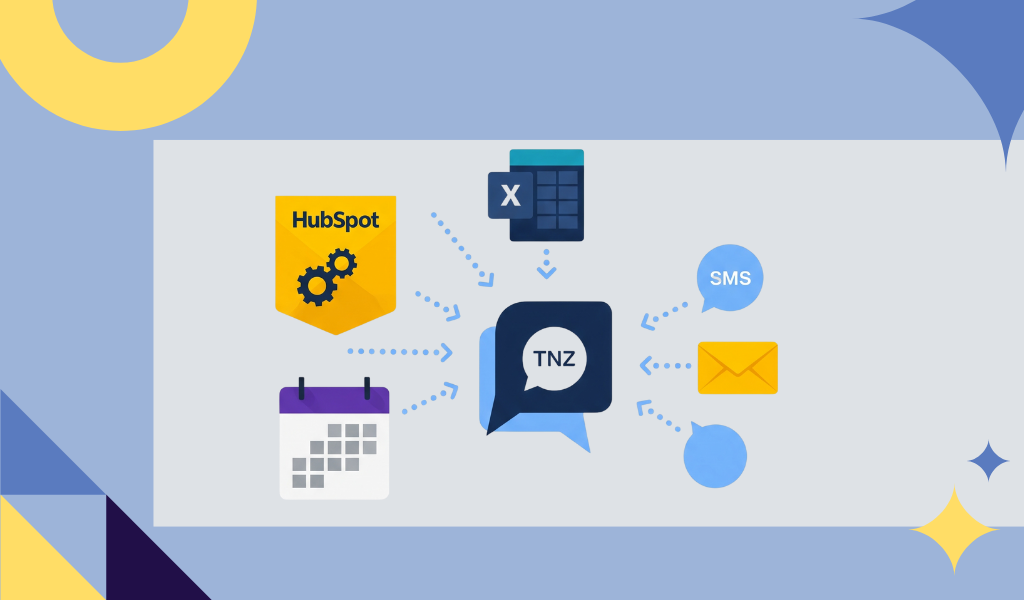
Start with SMS and use Email, Voice or Fax where the integration supports it. If your software is not listed, check Zapier or use the TNZ developer APIs and libraries. TNZ can also scope a bespoke endpoint at $180 per development hour with a $99 monthly endpoint fee, subject to technical review.

CRM and contact management

Connect TNZ with your favourite CRM tools to trigger automated updates, reminders, or alerts based on client activity.

Supported platforms include:

  • HubSpot
    Send SMS directly from contact records and trigger automated messages from your HubSpot Workflows to engage leads and customers at the perfect moment.
  • GoHighLevel
    Integrate TNZ as your trusted local sending gateway for superior SMS deliverability and reliability within your GHL marketing automation.
  • Pipedrive
    Automate SMS updates and reminders as deals move through your pipeline, keeping your sales process efficient and your clients informed.

You can trigger messages from deal stages, form submissions, tags, or contact fields: with responses logged automatically.

Automation tools and triggers

Low-code/no-code platforms can help you automate workflows without extensive programming knowledge.

  • TNZ Workflows
    Use TNZ's built-in workflow engine to create automated communication sequences based on triggers like whether a message fails or a contact responds..
  • Zapier, Make.com & n8n
    Connect TNZ with your favourite apps to automate workflows and trigger messages based on events.
  • Power Automate
    Use TNZ with Microsoft Power Automate to create custom workflows that integrate with your existing Microsoft 365 tools.

These platforms make it easy to set up automated workflows without needing to write code. You can trigger messages based on events in other apps, or use TNZ to kick off actions elsewhere.

Calendar and office messaging

Connect TNZ with your office apps to automate appointment reminders, advisory messages or follow-ups.

Outlook & Google Calendar:

Use Google Calendar or Outlook to schedule SMS or email messages using simple event notes. Add a shortcode like SMS=0211234567 to your calendar and TNZ handles the rest: perfect for appointments, confirmations, or day-before reminders.

Excel & Google Sheets:

Use Excel or Google Sheets to upload contact lists, filter by tags or dates, and send personalised messages at scale. TNZ supports:

  • Bulk messaging from spreadsheets;
  • Custom field substitution (e.g. name, time);
  • Delivery and response tracking.

API access for developers

The unified API covers every messaging channel and includes libraries, webhook support and usage tracking.

  • Trigger messages from your own systems and apps using HTTP, SMTP or SMPP.
  • Send responses back to your app or dashboard using webhooks.
  • Monitor delivery and engagement in real time.
  • Use SDKs and libraries for popular languages like Python, Node.js, PHP, and more.
  • Develop quicker with Postman collections and detailed OpenAPI JSON and YAML docs.

TNZ feature summary

Feature Included
SMS Messaging (1-way & 2-way)
Transactional Email
Voice Messaging & Voice Broadcast
Virtual Fax (Sending & Receiving)
Instant Messaging (WhatsApp, etc)
Workflows, Automation & Triggers
Unified REST API & Plugins/Libraries
Webhooks for Real-Time Updates
Calendar Integrations (Google, Outlook)
CRM Integrations (HubSpot, Pipedrive, etc)
SubAccounts & Billing Groups
Public Self-Registration Portal (Add-on)
URL Shortening & Click Tracking
Secure NZ-Based Hosting
Local NZ Support

Frequently asked questions

Here are answers to some common questions. If you don't see your question here, feel free to visit our Help Centre or use the contact page to reach sales, support and faults, or billing.

No. Many users connect TNZ to a calendar, CRM or internal system and let the automation run without opening the dashboard. The dashboard remains available for templates, manual sends and reporting.

Yes. You can activate only the services you need. Many customers start with business SMS and later add email, voice, or fax when the time is right. TNZ is built to grow with you.

Absolutely. TNZ integrates with most major CRMs, booking tools, and internal systems. You can send messages using API calls, calendar notes, spreadsheet uploads, or even email-to-SMS.

That's no problem. Replies can be forwarded directly to your inbox, viewed in the TNZ dashboard, or pushed to your system using a webhook. You choose what works best for your team.

No. TNZ operates on a monthly subscription with no lock-in contracts. You can start, pause, scale, or cancel at any time.

Support is included with all plans. TNZ's support team is based in New Zealand and available by phone or email. We help with everything from setup to integrations and technical questions.

Yes. All data is hosted in New Zealand or Australia, and TNZ is built to meet local regulations including the Privacy Act and the Unsolicited Electronic Messages Act (UEMA).

Yes. TNZ regularly helps businesses migrate from other platforms. We can assist with moving your templates, contact lists, and workflows so the transition is smooth and stress-free.

SMS FAQ

SMS marketing is a way to reach your customers by sending text messages directly to their phones. These messages can be used for promotions, updates, reminders, or service alerts. With TNZ, you can send SMS messages manually, in bulk, or automatically through your CRM, calendar, or API.

Bulk SMS marketing sends a message to a large group at once, such as for a campaign, seasonal update or urgent alert. TNZ lets you upload contact lists, personalise messages and track delivery and responses.

First decide which messages you want to send, such as appointment reminders, promotions or service alerts. Then choose the dashboard, Email-to-SMS, a CRM integration or the API. You can begin with one message type and add more later.

Yes, provided you follow the rules. The Unsolicited Electronic Messages Act (UEMA) requires:
  • You have consent from recipients to receive messages (they have filled in a consent at sign-up or have inferred consent by purchasing a product or service);
  • You include a clear opt-out option in every message (such as the industry accepted "reply STOP to OptOut");
  • You identify yourself as the sender (your business name or brand must be clearly stated in the message).
TNZ is designed to help you comply with these regulations, with features like opt-out management and local data hosting.

Yes. The REST API lets developers add SMS, email, voice and fax to an application. Documentation and libraries are available for Node.js, Python and .NET.

All features available in our dashboard are also accessible via the One API.

Yes. Zapier provides no-code connections to other apps, while native integrations such as HubSpot let you send SMS from your CRM.

The One Dashboard shows whether each message was sent, delivered or failed, with logs for further detail. API responses provide immediate status codes, and webhooks can send delivery receipts to your application as the status changes.

Yes, two-way SMS is a core feature of our platform. You can lease a dedicated 4-digit, 5-digit or 6-digit short code from us to receive replies. Incoming messages can be viewed in our dashboard, forwarded to your email address, or processed automatically by your application via an API webhook. This is ideal for appointment confirmations, customer support, and interactive campaigns.

The Sender ID is the name or number that appears on a recipient's phone. In New Zealand and Australia, you can often set this to your brand or company name (up to 11 characters) for one-way marketing or alert messages. For two-way conversations, a dedicated mobile number is required. Our platform gives you full control to manage Sender IDs to suit your needs.

A standard SMS is limited to 160 characters. TNZ joins longer messages so they appear as one message on the recipient's phone, but billing still applies to each 160-character segment.

TNZ offers simple, pay-as-you-go pricing with no setup fees or fixed monthly commitments for standard accounts. You only pay for the messages you send. Our pricing is transparent and highly competitive, built on our direct carrier relationships in New Zealand and Australia. For detailed rates and volume discounts, please see our pricing page or contact our team.

TNZ routes messages through local carrier networks, hosts data in New Zealand or Australia and provides support from New Zealand. SMS, email and voice are available through one dashboard and one API.

Email FAQ

Transactional emails are one-to-one messages triggered by an action such as booking a service, resetting a password or issuing an invoice. They contain information the recipient expects and are separate from marketing campaigns.
`

Transactional emails are sent to individuals and contain personalised information (e.g. a receipt or reminder). Marketing emails are sent to a group and promote an offer or event (e.g. a sale or newsletter). TNZ focuses on reliable, compliant delivery of transactional email, with optional SMS or voice backup for time-sensitive cases.

No. You can use the TNZ dashboard to send messages, upload templates and schedule follow-ups without writing code. Developers can use the API for automation and system integration.

Developers and system administrators can connect applications through the REST API or a standard SMTP relay. Existing software can then send invoices, alerts and password resets automatically.

Standard email providers such as Microsoft 365 and Google Workspace are intended for person-to-person communication. Automated high-volume sending through them can encounter daily limits, poor delivery or damage to your sender reputation. TNZ email is configured for transactional messages sent at volume.

Deliverability is our top priority. We help you protect your sender reputation by providing tools to set up essential authentication records like SPF, DKIM, and DMARC. Our New Zealand-based infrastructure, managed IP addresses, and proactive monitoring of sending practices ensure high inbox placement rates. We handle the technical complexity so your critical communications are trusted by receiving email servers.

Yes, and we highly recommend it. Sending from your own authenticated domain (e.g., alerts@yourcompany.co.nz) builds trust and brand recognition with your recipients. Our One Dashboard provides a simple, step-by-step guide to help you authorise your domain for sending through our platform, strengthening your deliverability from day one.

Yes. Our platform provides real-time engagement tracking. You can monitor delivery rates, bounces, opens, and clicks directly from the dashboard or receive this data via API webhooks. This gives you clear visibility into how recipients are interacting with your critical communications.

TNZ handles email, SMS and voice on the same platform, so you can set fallback rules between them. The One API can send an SMS or trigger a text-to-speech call when an email bounces or is not opened within a set time.

Voice FAQ

Voice broadcast is the process of sending a voice message to multiple recipients at once. This can be done using pre-recorded audio or text-to-speech. It's commonly used for emergencies, reminders, and time-sensitive alerts. TNZ supports voice broadcasting through the dashboard, API, or automation tools.

Use voice when your message is urgent, time-critical, or needs to be heard clearly. Voice is especially effective for:
  • Emergency alerts (e.g. weather warnings, safety instructions);
  • Service outages (e.g. internet or power outages);
  • Payment reminders (e.g. overdue invoices);
  • Two-factor authentication (e.g. account security codes and number validation);
  • School and Aged Care check-ins.
A ringing phone may be noticed sooner than an SMS or email. Voice is useful when the recipient needs to hear an urgent message.

Yes. With TNZ, you can automate voice messaging using:
  • Calendar notes (e.g. Google or Outlook);
  • CRM updates or triggers (e.g. HubSpot, GoHighLevel, Pipedrive);
  • Fallback login (e.g. fallback to voice if the SMS isn't replied to);
  • Apps (e.g. use middleware apps like Zapier and Make.com to trigger calls);
  • Email-to-Voice (a simple email can trigger a voice call);
  • API calls from your application.
This allows you to send timely, relevant voice messages without manual intervention.

The Text-to-Speech (TTS) engine converts written text into speech. Enter a message in the dashboard or send it through the One API, and TNZ will place the call and read it aloud. This supports personalised details such as a verification code, customer name or outage location without pre-recorded audio.

You have full control over the Caller ID (the number displayed on the recipient's phone). You can set it to a TNZ virtual number you lease from us, or to your existing business landline or mobile number. We complete a simple verification process to ensure you own the number before enabling it as a Caller ID.

Answering Machine Detection can leave the message on voicemail or end the call and record it as "unanswered". You can then retry unanswered numbers after a set period.

Yes. You can configure voice calls to accept keypad input (DTMF tones). For example, you can ask a recipient to 'Press 1 to confirm receipt of this message' or 'Press 2 to be connected to the on-call technician.' The results are captured in real-time in your dashboard and via the API, giving you a complete audit trail of who has acknowledged your alert.

Our One Dashboard provides detailed, real-time reporting for all voice campaigns. You can see at a glance which calls were answered, unanswered, went to voicemail, or failed. If you have included keypad options, you can also see a breakdown of the responses. All this data is also available via our API for direct integration into your systems.

A virtual number (also known as a local number or DDI) is a regular phone number that isn't tied to a physical phone line. Instead, it uses our network to intelligently divert incoming calls to one or more destinations, such as your mobile phone, a colleague's phone, or even an international number. It provides a professional, local presence for your business without the need for expensive hardware.

Businesses use our virtual numbers to:
  • Present a professional image with a dedicated business landline number.
  • Separate work and personal life by keeping your personal mobile number private.
  • Manage calls as a team by diverting one number to multiple mobiles simultaneously or in sequence.
  • Never miss a call with smart fallback and voicemail-to-email options.
  • Establish a local presence in different cities without needing a physical office.

Fax FAQ

A virtual fax lets you send and receive faxes online without using a fax machine or phone line. With TNZ, you can fax directly from your email, dashboard, or API. Faxes are delivered securely and arrive as PDF attachments.

TNZ does not offer free faxing. Its paid virtual fax service supports secure document transmission for organisations such as healthcare, finance and legal providers.

Yes. With TNZ, you can send a fax by emailing the document to a special address that routes it through our secure platform. You can also receive faxes into your email inbox as PDFs.

Yes. You can port your existing fax number into TNZ and continue using it with our virtual system. Or we can provide a new local or toll-free number to suit your needs. We provide fax numbers in New Zealand, Australia and a handful of international locations.

Yes, security is at the core of our platform. Unlike a traditional fax machine that can leave sensitive documents in a public tray, our service transmits faxes over encrypted connections. Faxes you receive are delivered directly to your authorised email inbox as private PDF files. All data is securely hosted in our New Zealand-based data centres, helping you meet local data sovereignty and privacy requirements.

Our platform provides complete delivery confirmation. For every fax you send, you'll receive a detailed confirmation receipt via email, which acts as your proof of transmission. In the One Dashboard, you can view a full history of all sent and received faxes, including their status, page count, and duration. This provides a clear and permanent audit trail for your records.

Yes. Developers can use the One API to add fax sending and receiving to patient management, legal or accounting software. This allows routine document transfers to run automatically.

API & Developer FAQ

An SMS API lets an app, CRM or website send SMS messages programmatically. The TNZ API also supports email, voice and fax through the same integration. Developers can start with a test-mode REST request and follow the documentation for .NET, Python, TypeScript/Node.js, VBA or MCP.

TNZ provides 25 free test credits for trying the API. Live messages are billed per send, without a contract or upfront fee.

Yes. TNZ integrates with platforms like HubSpot, Pipedrive, and GoHighLevel. You can trigger messages directly from contact records, automate reminders, or log replies back into your system.

Yes. TNZ's API includes real-time delivery tracking, webhook notifications, and full reporting tools. You can track message status, response rates, and costs, down to the subaccount level.

The One API is a REST API that uses standard HTTP methods and returns JSON responses. The developer portal has code examples, reference documentation and an OpenAPI specification.

Yes. Official libraries for Node.js, Python and .NET handle common tasks such as authentication, sending messages and processing responses. They are available from GitHub and package managers including npm and pip.

TNZ uses webhooks to send updates to your application. Configure a URL in the dashboard and TNZ will send an HTTP POST request when a message arrives or a delivery status changes. Your application does not need to poll the API for updates.

The One API can manage address books, opt-outs, reports, users and Partner subaccounts as well as sending and receiving messages. Actions available in the dashboard can also be automated through the API.

Yes. A call to the Workflow endpoint can start a sequence across several channels. For example, send an alert by email, follow it with an SMS if the email is not opened within 10 minutes, then place a text-to-speech call if there is still no response.

Still have a question?

Find answers to your questions and explore detailed guides.

Visit Our Help Centre →
"Switching to TNZ has been super easy. Just a quick URL change and we were up and running with much lower messaging costs. We rationalised multiple services into a single API endpoint."

Get started with TNZ

Move an existing messaging service to TNZ or begin with SMS and email, then add other channels when you need them.

  • Start with a free trial: no credit card needed.
  • Book a demo and see how it fits your workflow.
  • Talk to our local support team.