














GoHighLevel Workflows: The Complete SMS Automation Guide for Agencies
Topics: SMS – 30 Jun, 2026

Agencies running GoHighLevel automate almost everything: lead follow-up, appointment reminders, review requests, the lot. Then they hit the same wall. How do you send SMS inside those workflows without the default option being expensive and unreliable?
This guide shows you how to set up GoHighLevel SMS automation with TNZ, whether you manage hundreds of sub-accounts or run a single business here in NZ.
TNZ SMS plugs into GoHighLevel in two main ways: Conversations and Workflows.
⚡ Two Ways TNZ Works in GoHighLevel
💬
Conversations: one-to-one messaging
Send and receive SMS directly with customers, all inside GoHighLevel. A customer texts you, the message lands in their contact record, you reply without leaving the platform. No switching apps. No second system to check.
⚙️
Workflows: automation at scale
Automated sequences triggered by what a customer does. Something happens, an SMS goes out. Set it once, and it runs on its own.
🚀 GoHighLevel Workflow Examples
Here's what agencies are automating with TNZ SMS right now. Each one is a trigger, an action, and (where it matters) a branch based on the reply.
📅
Appointment reminders
An appointment is booked. Twenty-four hours before, the contact gets an SMS reminder. They text back "YES" to confirm, and the workflow updates the record or alerts your client's team. Fewer no-shows, no manual chasing.
🎯
Lead follow-up sequences
A contact fills in a form on the website. They get an SMS straight away. Another at 24 hours. A third at 72 hours. The moment they reply, the sequence stops and the message appears in Conversations for a human to take over.
📞
Missed-call recovery
A call goes unanswered. A workflow fires an SMS: "Sorry we missed you. Reply YES to reschedule, or we'll call you back." Their reply can trigger the next workflow automatically.
🎂
Birthday offers
A birthday is saved to the contact's profile. On the day, they get an SMS with a one-off offer code. Set up once, runs every year.
⭐
Review requests
A job is marked complete or an invoice is paid. A day later, the customer gets an SMS asking for a review, with a direct link. Replies route back to Conversations so nothing gets missed.
💳
Payment and invoice reminders
An invoice goes overdue. A polite SMS nudge goes out, then a firmer one a few days later if it's still unpaid. When they reply to sort it out, the sequence pauses for a human.
All of this runs without anyone hitting send. That's the point of automation: the work happens whether you're watching or not.
🔄 Why Replace LeadConnector with TNZ?
GoHighLevel's built-in SMS provider is LeadConnector. It's fine in most of the world. For New Zealand numbers, delivery is expensive and unreliable, and across dozens of sub-accounts that cost multiplies fast.
TNZ is built for the New Zealand market. We have direct relationships with NZ carriers, we send from compliant NZ short codes, and our pricing is a fraction of LeadConnector's for New Zealand and Australian SMS messaing. No setup fee. No lock-in. The swap is one click: change the default SMS provider, and every workflow in that account starts sending through TNZ.
⚙️ How to Set Up GoHighLevel SMS Automation
Setup depends on whether you're an agency managing clients or a standalone business. You can see how the pieces fit together on our GoHighLevel integration page.
Setting up TNZ for your GoHighLevel agency
| 1. Create your TNZ account. Sign up at TNZ and verify your agency account. This is the master account you'll manage every sub-account from. Our GoHighLevel agency setup guide has the full walkthrough. |
| 2. Connect TNZ to GoHighLevel. In your TNZ Dashboard, go to Integrations → GoHighLevel and click "Connect to GoHighLevel." Approve the connection in your GoHighLevel account, and you're linked. |
| 3. Install TNZ SMS to your sub-accounts. Back in your TNZ Dashboard, you'll see your GoHighLevel sub-accounts listed. Install TNZ SMS to all of them at once, or pick specific ones. There's an option to auto-install for any new sub-accounts you create later. Choose, then click Install. |
| 4. Change the default SMS provider in each sub-account. In each sub-account, go to Settings → Integrations → SMS Provider and switch the default from LeadConnector to TNZ SMS. Every workflow in that sub-account now sends through TNZ. |
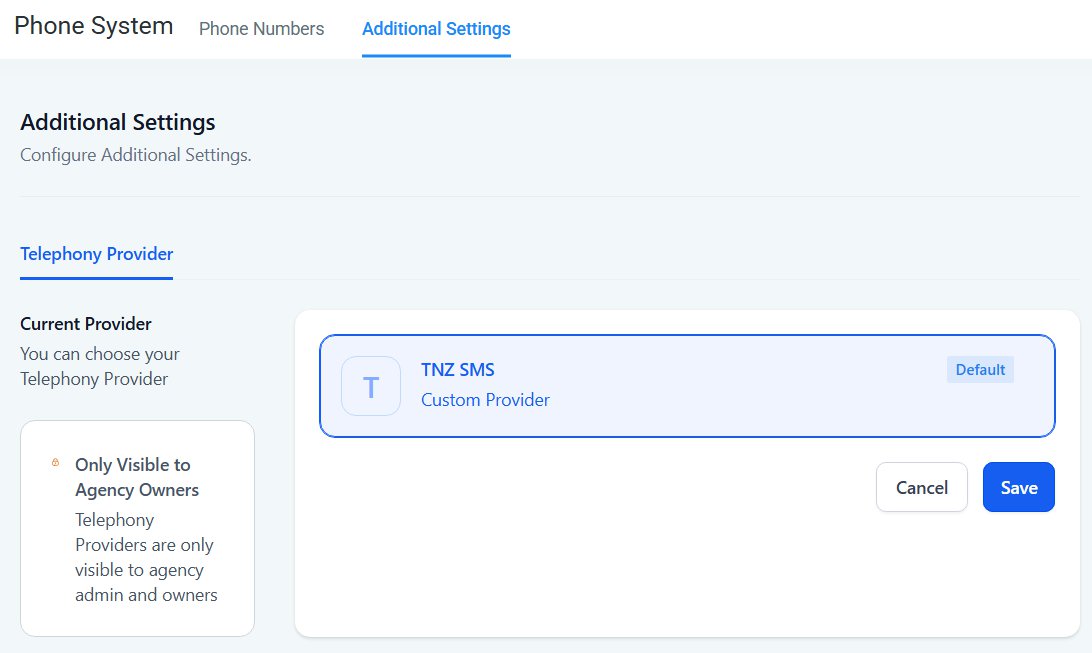
TNZ SMS is live. Users can send in Conversations and add SMS actions to workflows. Replies land in Conversations. The billing comes to you.
Standalone business setup
Simpler. Create your TNZ account, connect to GoHighLevel, then change your default SMS provider in your GoHighLevel settings. Our standalone setup guide walks a solo operator or single team through it.
🏷️ White-Labelling SMS for Your Clients
Your clients never need to know TNZ exists. They log into their white-labelled GoHighLevel account and SMS is simply there. You handle the integration, the billing, and the technical side.
This is how a lot of agencies position it: "an AI-powered CRM with automated lead follow-up." Behind the scenes, that's GoHighLevel plus TNZ plus your workflows. The client sees one product. It just works.
💬 How SMS Replies Work in GoHighLevel
When a customer replies to a workflow SMS, the message appears in GoHighLevel Conversations under their contact record. You read it and reply right there.
The useful part is that workflows can listen for replies. A customer gets a reminder and texts "CONFIRM." A workflow detects it and fires the next action: a calendar link, a team notification, or a different sequence entirely. This is two-way messaging, not broadcast. It's a conversation your automation can act on.
🇳🇿 New Zealand SMS Rules for GoHighLevel Workflows
A few NZ rules shape how you send.
Why you can't send from a mobile number in NZ
New Zealand requires bulk business messages to come from a short code, not a standard 02X mobile number. Carriers block bulk messages sent from regular mobiles. TNZ gives you a short code, and all your messages send from it. Customers see a short number rather than a name. That's normal in NZ, and it's compliant.
Reply windows
⏱️ Five-day reply window
When you send an SMS, the customer has a five-day window to reply. Every time they reply, the window resets. Send another message and the clock starts again, so conversations flow without arbitrary cut-offs.
When you send an SMS, the customer has a five-day window to reply. Every time they reply, the window resets. Send another message and the clock starts again, so conversations flow without arbitrary cut-offs.
Short codes: shared vs dedicated
📨 Built-in Short Code (default)
- A 3-6 digit number
- Mixed with other messages with the same use-case
- Mobiles can reply back (5-day reply window)
- No fixed cost (access is included in your TNZ plan)
- NZ carriers and customers are used to short codes; reliable delivery and replies both work
🔢 Dedicated Short Code
- A number no one else sends from, owned exclusively by you
- Fixed monthly access cost
- Carrier approval takes 4 weeks
- Best for high-volume agencies or where brand control is part of your offer
| Dedicated short code | Setup | Monthly |
|---|---|---|
| 6-digit | $299 | $89/month |
| 4-digit | $599 | $299/month |
Sending to Australia
AU rules differ: carriers allow local mobile numbers (04xx) and custom sender IDs, so your brand name can show as the sender. This guide focuses on NZ because that's where most TNZ users send, but we support AU SMS too.
💰 SMS Pricing for GoHighLevel Agencies
What it costs
TNZ is $20/month plus $0.10 per SMS sent and received.
| Item | Cost |
|---|---|
| Setup | $0 |
| Monthly fee | $20/month |
| SMS sent | $0.10 each |
| SMS received | $0.00 each |
| Per-sub-account fee | $0 |
SMS "parts" work like this: 160 characters is one part. Go over 160 and the message splits into two parts, and you pay for both. Add emoji or special characters and the limit drops to 70 characters per part, so longer messages split sooner.
📋 Example: a typical month
Send 100 messages (160 characters each) and receive 50 replies. Your cost is $20 base + $10 outgoing + $0 incoming = $30 for the month.
How agencies get billed
TNZ sends you one invoice a month showing your agency's total. Alongside it, you get a CSV that breaks down exactly which sub-account sent how many messages and what each cost. That CSV is how you rebill clients accurately.
Scaling to 100+ sub-accounts
There's no per-sub-account fee from TNZ. Ten sub-accounts or 300, you pay one base fee. Billing scales with what you actually send, not with how many accounts you manage.
📋 Example: 250 sub-accounts
You sign up with TNZ once, connect to GoHighLevel once, and install TNZ SMS to all 250 in one go. Toggle the default provider to TNZ in each account. Setup time: about 30 minutes.
Now every account can send SMS, every workflow can include SMS actions, and replies land in Conversations. Each month you get one invoice and a CSV listing all 250 sub-accounts: sub-account A sent 87 messages ($8.70), sub-account B sent 230 ($23), and so on. You apply your markup and on-charge.
Add three clients next month? Add the TNZ SMS app in GHL, switch the Default Provider, and they're operating immediately. You're only charged for their additional SMS usage.
✅ Why Choose TNZ for GoHighLevel SMS
🇳🇿
Built for New Zealand
Local carrier relationships and a deep read on NZ compliance. Sending NZ SMS through US-focused providers costs more and delivers worse. NZ is our core business, so we've tuned pricing and reliability around it.
🏢
Made for agencies
Pricing scales with usage, not account count. No per-account charges, no surprise minimums, and a CSV breakdown so you can rebill clients accurately.
🤝
Local support
We're a New Zealand company. When you need help, you get a Kiwi team that understands NZ business and NZ networks.
📶
Reliable delivery
Our short codes are whitelisted with NZ carriers, so messages get through and replies come straight back, with no spam-filter surprises.
🔌
Simple to run
One-click integration. Install once, it works across every sub-account, and you scale from 10 to 300 with no extra setup.
This isn't theory. NZ medical centres use TNZ appointment reminders to cut no-shows and recover revenue from missed bookings. Real estate agents run automated SMS and voice campaigns through TNZ and see better turnout with far less manual work. The same automations sit one workflow away inside your GoHighLevel accounts.
❓ Common GoHighLevel SMS Questions
Can different sub-accounts send from different short codes?Not currently. When TNZ is the default SMS provider, all sub-accounts send from the sam short code. If you need different numbers per sub-account for branding, talk to the TNZ team. |
What if I want a dedicated short code for my agency?You can have one, owned exclusively by you. Setup costs and timeframes are in the dedicated short codes section above. It's best for high volume or specific branding needs. |
Do my sub-account users need their own TNZ login?No. They use TNZ SMS through GoHighLevel and don't need to log into TNZ directly. You manage the integration at agency level. GoHighLevel Agency Pro users can optionally configure TNZ Dashboard SubAccount logins for clients. |
How long does setup take?Connect and install: about 10 minutes. |
Can I move off TNZ later?Yes. Switch the default SMS provider back to LeadConnector or another provider any time. Your workflows stay intact and use the new provider. |
A customer texts in, can I reply?Yes. Their message shows in GoHighLevel Conversations, you reply there, and it goes back through TNZ to their phone. |
Can a workflow react to an incoming SMS?Yes. A workflow can listen for a reply like "CONFIRM" and trigger the next action automatically: a calendar link, a team alert, or another sequence. |
🎉 Get Started with GoHighLevel SMS Automation
Ready to add reliable SMS to your GoHighLevel agency?
Start with a free trial: 20 credits over 14 days, no credit card, no commitment. Full access to every feature. Connect GoHighLevel, build a workflow, and watch SMS run on its own.
Start your free trial today!
Ready to revolutionise your messaging?
Connect with people anywhere - boost engagement, responses and conversations.
20 credits over 14-days. No obligation. No credit card required.