📢 For GoHighLevel Agency Pro Plan users.
If you're on the Starter or Unlimited GHL plan, see our TNZ SMS Basic app instead.
⚡ How TNZ Works Inside GoHighLevel
Before connecting, here's what to expect:
- Once TNZ is set as your default SMS provider, all standard Send SMS actions in GHL route through TNZ automatically.
- When mobiles respond, their reply will appear inside GHL.
- You send and receive messages entirely inside GHL, no need to switch tools.
- When sending to New Zealand mobiles, messages send using TNZ's compliant NZ short code. A dedicated number is available.
- When sending to Australian (and most international) mobiles, messages send from a local number. A dedicated number or custom Sender ID is available
- TNZ invoices the Agency by default, with itemised SubAccount usage for easy rebilling. You can switch to direct customer billing if preferred (see Direct Customer Billing).
- Certain system messages (like GHL login codes) remain controlled by GHL and cannot be changed.
The TNZ SMS app adds SMS capability to the following GHL features:
💬
Conversations
1:1 chats with mobile contacts, directly in GHL.
⭐
Review Requests
Send clients a link to complete a review via SMS.
📣
Bulk Actions
Broadcast messages to multiple contact mobile numbers at once.
⚙️
Workflow Automations
Automate SMS sending and receiving - form completions, calendar reminders, birthday messages, and more.
Getting Started: Trial & Account Setup
When you sign up, you can select a Free Trial or a Full Postpaid Account:
🧪 Free Trial
- 14 days access
- 30 SMS credits included
- Full access to SMS features in GHL (Conversations, Workflows, Review Requests, Bulk Actions)
- Access to TNZ Dashboard for reporting
✅ Full (Postpaid) Account
- All trial features, with no credit limit
- $20/month + usage (see pricing below)
- Monthly itemised invoice per SubAccount
- Does not activate automatically - you must convert your trial
Start Your Free Trial →
Pricing (NZD ex GST)
When your trial ends and you're on a full account, here's what you can expect to pay:
| Item |
Cost |
| Setup |
$0 |
| Monthly Fee |
$20 /month |
| SubAccount Fee |
$0 (unlimited SubAccounts) |
| SMS to NZ Mobiles |
$0.10 /SMS Part |
| SMS to AUS Mobiles |
$0.10 /SMS Part |
| SMS to International Mobiles |
$0.20 /SMS Part |
Messages longer than 160 characters are split into parts and billed per part. See Long SMS Messages for details.
Installation: Connecting TNZ SMS to Your Agency & SubAccounts
These steps outline how to install the TNZ SMS app for your SubAccounts.
Log into my.tnz.co.nz as your Agency-Admin.
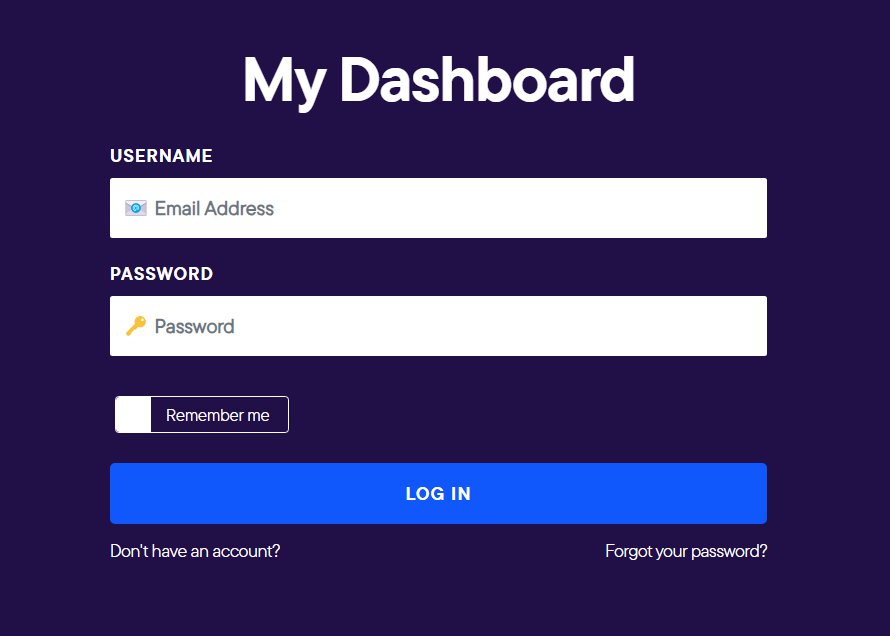
⚠️ Important: Username Match RequiredYour TNZ username must match your GHL Agency Owner username. A mismatch will prevent the app from installing. If your login usernames do not match, create a new
TNZ User.
Step 2: Connect TNZ to GHL
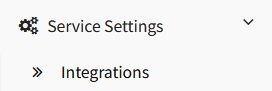
- In the TNZ Dashboard, go to Service Settings → Integrations.
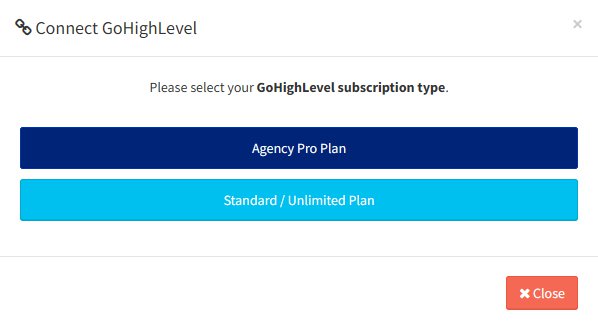
- Select GoHighLevel, then select the Agency Pro plan.
- Log into GHL, then approve the TNZ SMS features.
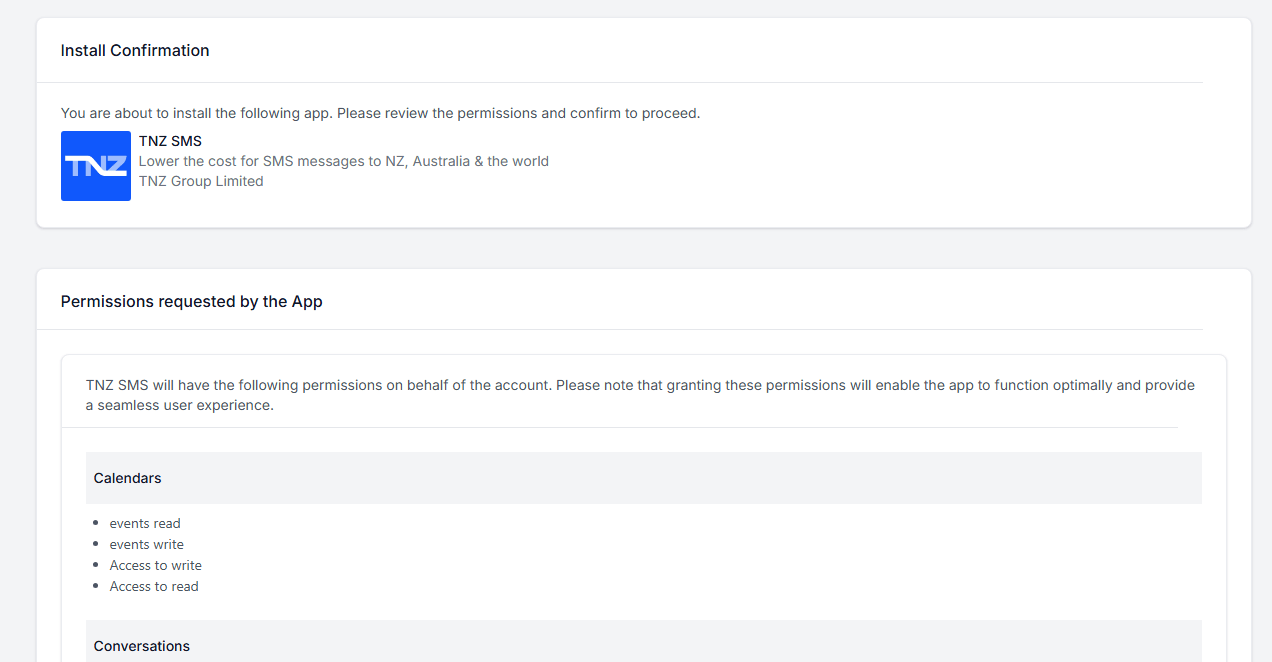
- Select the appropriate Account. You may select:
- Your Agency (you'll be able to select multiple SubAccounts), or
- Single SubAccount.
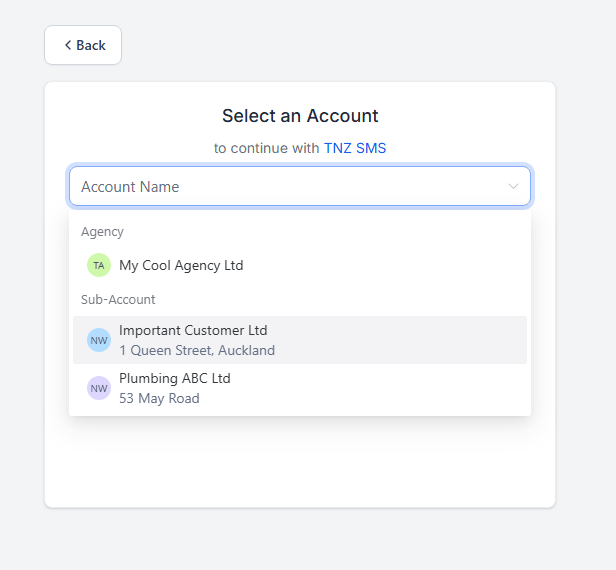
- If your Agency was selected, confirm automatic installation (optional). Then Proceed.
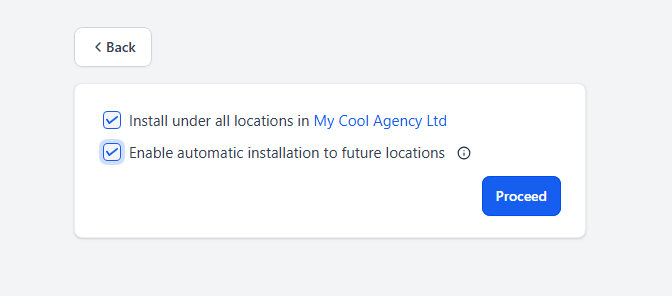
- Check both TNZ SMS options. Then Proceed.
- The first option allows displaying TNZ SMS as a Default Provider option.
- The second option allows use of TNZ SMS for features such as Conversations and Workflows.

- Done! The TNZ SMS app is now installed for the appropriate Agency/SubAccounts.
Step 3: Set TNZ as the Default SMS Provider (Optional)
This is an optional, highly recommended step - it sets your SMS messages to send using TNZ SMS by default.
⚠️ Agency-Admin Access
This step must be performed by the Agency-Admin GoHighLevel login (other login levels do not have the necessary privileges).
Should I toggle this option?
Default SMS Provider IS NOT TNZ SMS
|
Default SMS Provider IS TNZ SMS
|
| The SubAccount can use TNZ SMS only if using the 'TNZ SMS' premium action. Other SMS messages will use the default SMS Provider (usually LeadConnector). |
SMS messages will send using TNZ SMS. |
⚠️ Premium Action Costs
Using "Send TNZ SMS" or "Send TNZ Internal SMS" actions incurs a premium action cost, charged by GoHighLevel. Setting TNZ as the default provider so that you can use the standard "Send SMS" options can help you avoid these additional charges.
Can I toggle this for select SubAccounts?
Yes, you may enable TNZ SMS for specific SubAccounts only.
For example, you may wish to use TNZ SMS for New Zealand and Australia SubAccounts, and retain LeadConnector for United States SubAccounts.
Simply toggle the Default SMS Provider for the target SubAccounts only.
How to toggle this option
| 1. Log into GHL as your Agency Admin user. |
| 2. Switch to a SubAccount where you want TNZ SMS as the default. |
| 3. Go to Settings → Phone Numbers → Advanced Settings. |
| 4. Choose TNZ SMS Provider as the default SMS provider and click Save. You must click Save regardless of whether TNZ SMS is already selected. |
| 5. Repeat this process for each applicable SubAccount. |
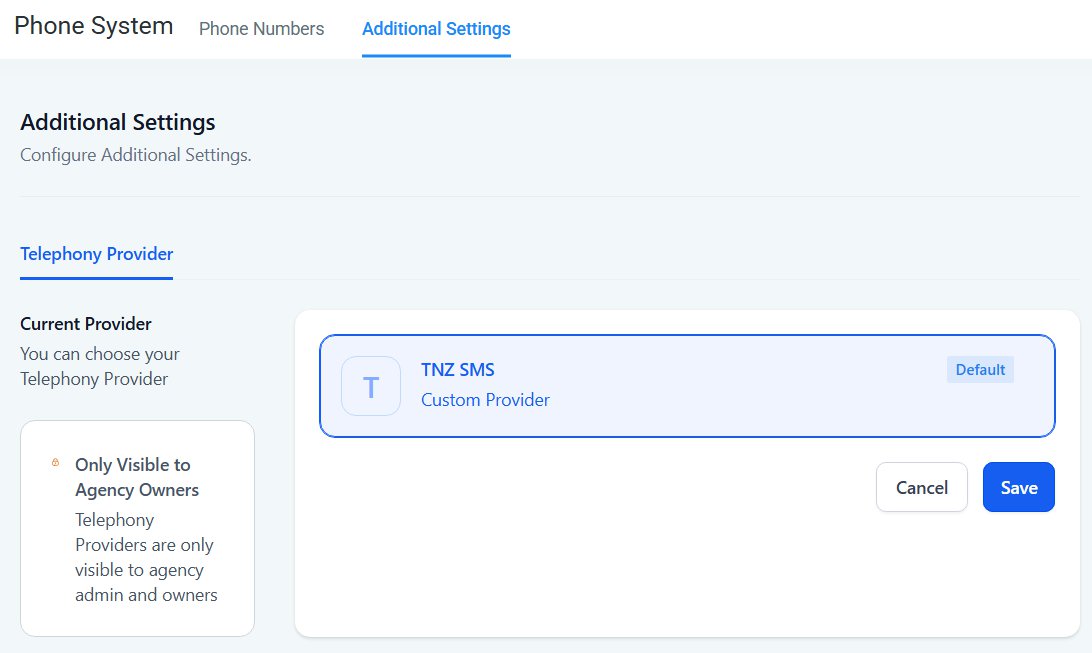
Note: High Level can take up to 10 minutes to sync this change.
Using TNZ SMS: Sending & Receiving SMS Messages
Conversations
Use the Conversations tool to send messages to contacts.
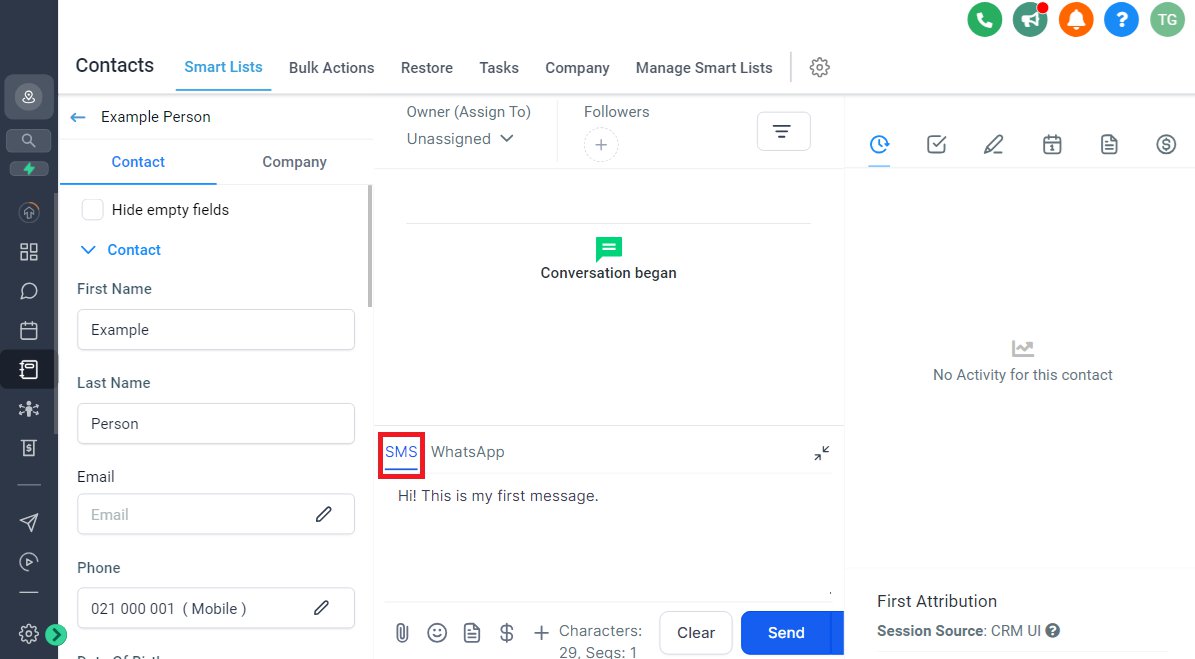
Replies from your contacts appear in the GHL Conversations tab.
Send SMS in Workflows
You can optionally use SMS messaging in Automations, for example, automatically send a welcome SMS when creating a new Contact, or sending a Happy Birthday message on a contact's birthday.
|
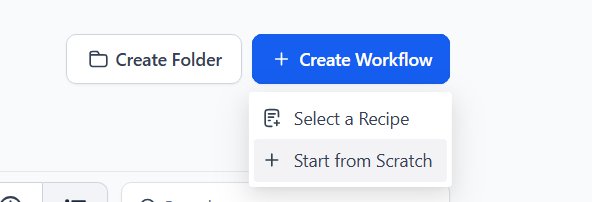
1. Create a new Workflow or open an existing one
|
|
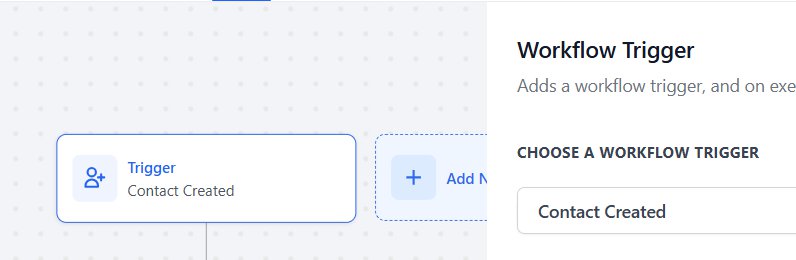
2. Configure an appropriate 'Trigger' that will cause your workflow to run
|
|
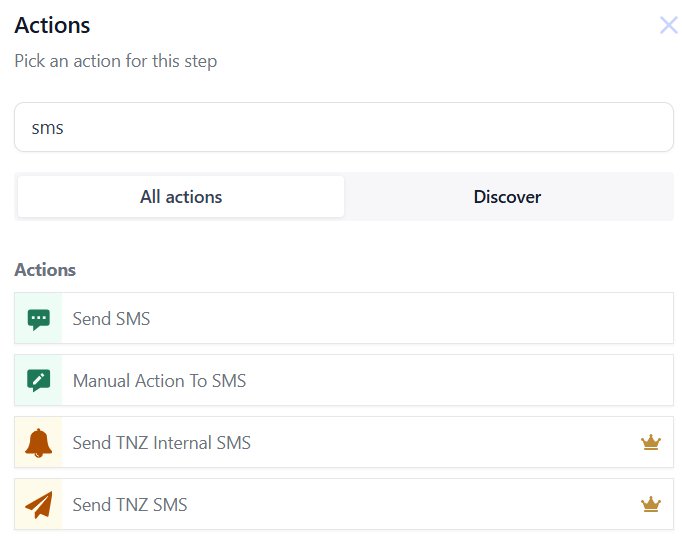
3. Add a new 'Action' and find 'Send SMS'
• Send SMS uses the default GHL SMS settings. If your default SMS Provider is TNZ SMS, it will use TNZ.
• Send TNZ SMS forces GHL to use TNZ SMS (additional Premium Action cost applies).
• Send TNZ Internal SMS forces GHL to use TNZ SMS to send a message to internal app users.
|
|
4. Enter your Message and send a test before saving your action
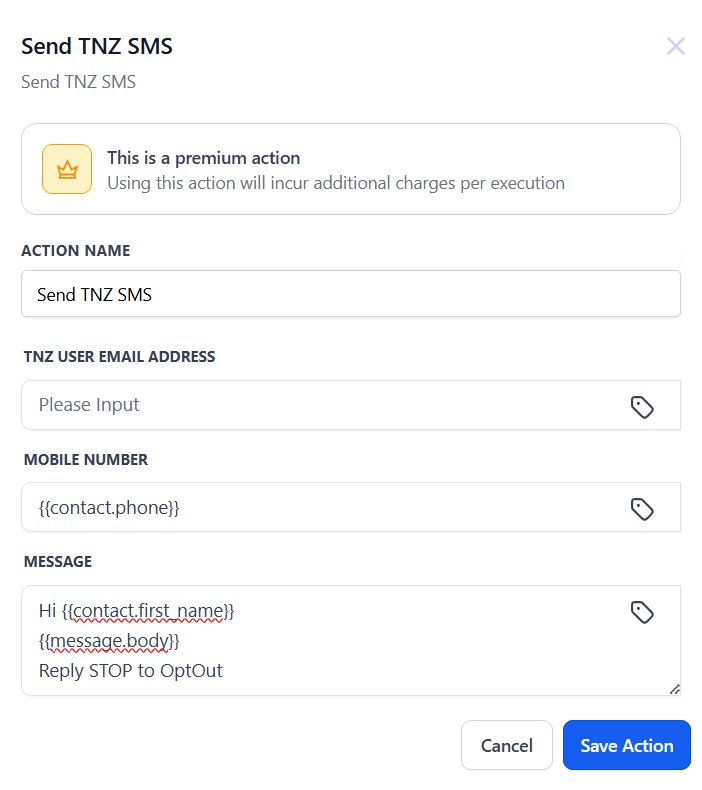
• Action Name is a description displayed in your workflow.
• Override TNZ User allows you to select the SMS Sender that should receive reports for the messages. By default, leave blank.
• Mobile Number is the mobile telephone number that should receive the SMS message. You may specify up to five other mobile numbers separated by commas. For international messages, ensure you use the full country code including the leading +.
• Message contains the SMS message to send and may include dynamic values. You may send messages longer than 160 characters and are charged per SMS Part (see Long SMS Messages).
|
Country Access: Exclusive Focus on New Zealand and Australia
TNZ SMS is purpose-built for NZ and AU, ensuring reliable delivery and compliance with local carrier rules. This regional focus means better performance compared to global providers who treat NZ and AU as secondary markets.
SMS Sender Numbers
The number or name that appears on your recipient's phone depends on the destination:
| Destination |
Sender format |
| New Zealand mobiles |
TNZ short code (3–6 digit number). Dedicated short codes available (learn more). |
| Australian mobiles |
Custom Sender ID supported (e.g. your business name) or Virtual Mobile Number |
| International |
Custom Sender ID or Virtual Mobile Number supported in most locations (learn more). |
Read our full guide on NZ SMS short codes →
Billing Options: Agency versus SubAccount
There are two billing models. Choose the one that suits how you manage your clients.
Option 1: Agency-Level Billing (Default)
At the end of each month, you'll receive an invoice (for the $20/month base fee plus SMS usage) and a SubAccount usage report.
The usage report makes it straightforward to determine what each client used and rebill them accordingly.
SMS does not use the built-in GoHighLevel rebilling - you must oncharge your clients outside of GHL.
📋 Example: Marketing Agency with 5 Clients
Bright Digital Agency manages SubAccounts for three clients: a real estate agency, a dental clinic, and a gym.
Each month, TNZ sends Bright Digital one invoice that looks like this:
| SubAccount |
SMS Parts Sent |
Cost (ex GST) |
| Ray White Auckland |
320 |
$32.00 |
| City Dental |
210 |
$21.00 |
| FitLife Gym |
180 |
$18.00 |
| Monthly base fee |
$20.00 |
| Total |
$91.00 |
Bright Digital can then rebill each client individually, with or without a markup.
Option 2: Direct Customer Billing
If you'd prefer not to handle billing on behalf of clients, TNZ can invoice each SubAccount directly.
In this model, each client registers their own TNZ account, connects their GHL SubAccount, and receives their own TNZ invoice. The Agency is removed from the billing chain entirely - no charges are passed to you for that client.
📋 Example: SubAccount Registers Direct With TNZ
Bright Digital Agency manages the GHL setup for City Dental, but City Dental prefers to pay their own messaging costs.
City Dental registers a TNZ account and connects their SubAccount. TNZ invoices City Dental directly. Bright Digital still handles the GHL configuration but has no involvement in that client's TNZ billing.
Each month, TNZ sends City Dental one invoice that looks like this:
| SubAccount |
SMS Parts Sent |
Cost (ex GST) |
| City Dental |
220 |
$22.00 |
| Monthly base fee |
$20.00 |
| Total |
$42.00 |
No invoices or costs are attributed to Bright Digital.
To set up direct customer billing:
- The SubAccount owner registers their own account at my.tnz.co.nz and connects their GHL SubAccount.
- The Agency then sets TNZ as the default SMS provider for that SubAccount.
Follow the TNZ SMS Basic guide for this billing option →
Troubleshooting: Common Issues
Messages Stuck as "Pending"
Follow these troubleshooting steps:
- Check the mobile number is correct.
Try calling it to confirm it's a valid, active number.
- Try sending via the "TNZ SMS" tab directly.
In GHL, under Conversations, select a conversation, select the TNZ SMS tab, then send a test message. This confirms whether the "Default SMS Provider" setting is the issue.
- Try re-installing the TNZ SMS app.
Follow the Uninstall TNZ SMS steps, then follow the Installation steps.
|
Messages Still Routing via LeadConnector (LC)
Some GHL system messages (such as login notifications) always use LeadConnector and cannot be changed.
For all other features (Conversations, Workflows, Review Requests), follow the Step 3: Set TNZ as the Default SMS Provider instructions above and re-save the setting, even if TNZ SMS already appears selected.
Wait for 10 minutes for HighLevel to sync the change.
|
Disable Email Notifications for SMS Replies
To disable email notifications for SMS replies:
- Log into the TNZ Dashboard
- Go to Users and select the appropriate user
- Click the SMS tab
- Set the SMS Reply Report Method to None
- Click Update
- Repeat for any other required users
|
Uninstall TNZ SMS
If you need to remove the TNZ SMS app from your agency or specific SubAccounts:
- Log into GHL as your Agency Admin user.
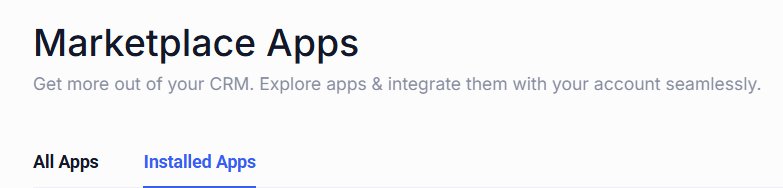
- Go to App Marketplace → Installed Apps.
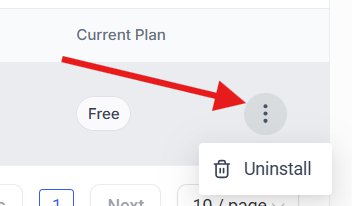
- Find TNZ SMS and click the three dots → Uninstall.
- Choose to uninstall from the entire Agency or specific SubAccounts as required.
- Confirm the uninstall.
⚠️ Uninstalling Your Default SMS Provider
Uninstalling the app will disconnect TNZ SMS from the affected SubAccounts. You may need to manually adjust the SubAccount's Default SMS Provider.
|
Frequently Asked Questions
Can I use my own mobile number or a custom Sender ID?
When sending to New Zealand mobiles, TNZ uses short codes only (learn more).
When sending to Australia and some international locations, a Custom Sender ID (e.g. your business name) or a Virtual Mobile Number (e.g. +61401020304) is supported (learn more). |
Do I need to leave GHL to send SMS?
No, all sending, receiving, and automation occurs within GHL.
You only need to log into the TNZ Dashboard for account management, billing, and reporting. |
Why are my messages stuck as "Pending"?
Usually because TNZ isn't set as the default SMS provider, or the app needs reinstalling. See the Troubleshooting section for step-by-step guidance. |
Why are GHL login codes still using LeadConnector?
GHL system notifications (such as login codes) always use LeadConnector SMS and cannot be changed to a custom provider. This is a GHL limitation, not a TNZ issue. |
Does the trial automatically convert to a paid account?
No. When your 14-day trial ends, you'll need to log into the TNZ Dashboard and manually convert to a full account. Your settings and SubAccount connections are preserved when you upgrade. |
Additional Assistance
If you have any questions or need help at any stage, the TNZ team is ready to assist.
Contact TNZ Support →