









REST API Docs
WorkflowSMSEmailVoiceText-to-Speech (TTS)FaxWhatsAppRCSWebhooksAddress BookOpt-OutPartner APIAPIs, Libraries & SDKs
 REST API
 TypeScript
 SMPP
SMPP Python
 MCP
MCP .NET
.NET SMTP Gateway
 VBA
VBA Flexi API
 HTTPS API
 SOAP API
 Other Tools REST APITypeScriptSMPPPythonMCP.NETSMTP GatewayVBAFlexi APIHTTPS APISOAP APIOther Tools
This guide details the field names and values when editing a TNZ User in the TNZ Dashboard.
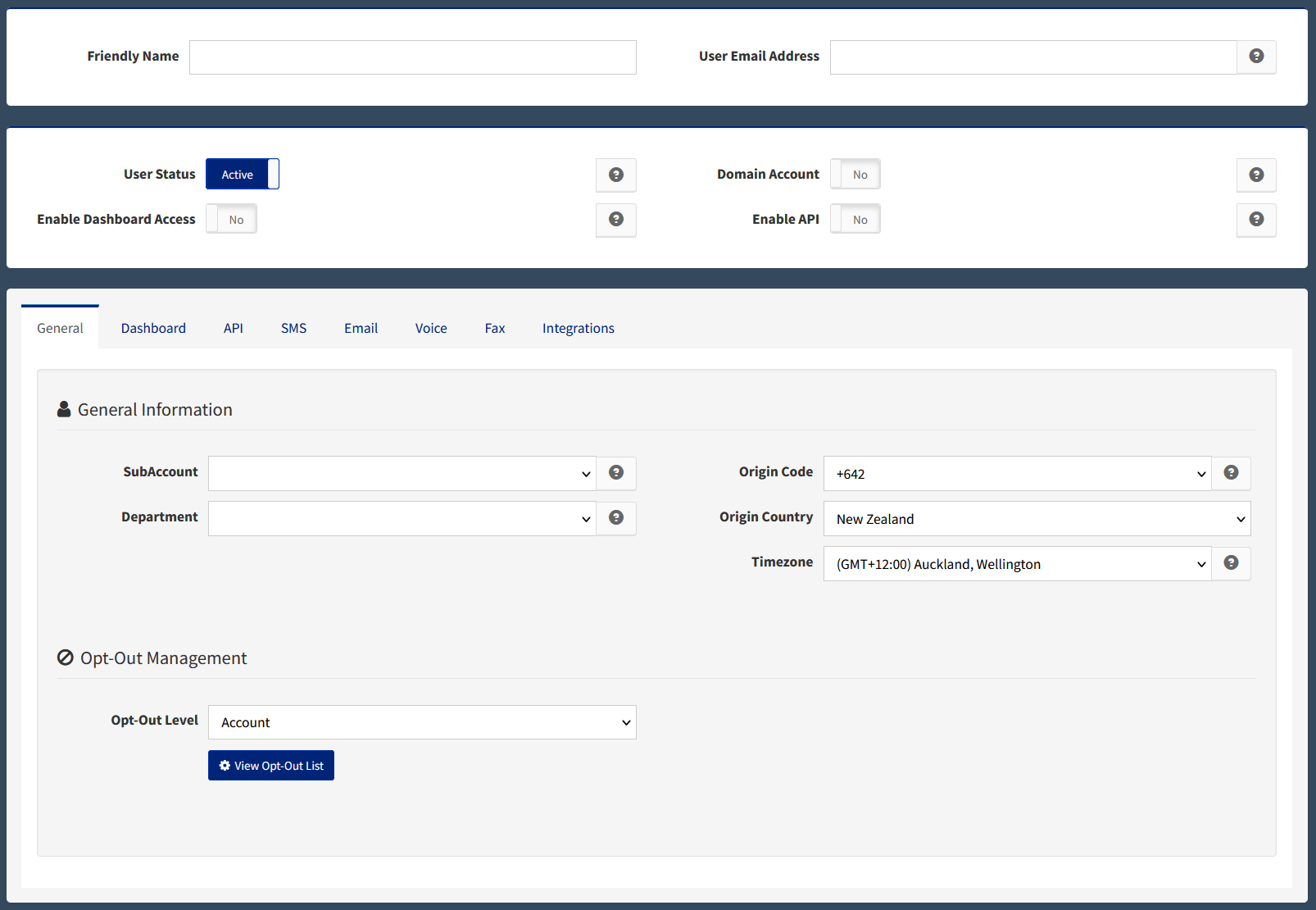
Identity and on/off switches. Always required when creating a User.
| Field | Description |
|---|---|
| Friendly Name | Optional friendly name shown in reporting and dashboards. |
| User Email Address | Email address to be authorised for sending messages. Use user.name@domain.com format, or for wildcard domain access, enter the domain only (for example, domain.com). |
| User Status | Active or Inactive. Setting a User to Inactive disables their ability to send messages. |
| Domain Account | Set to Yes to authorise every address at a particular domain. The User Email Address field must contain the domain only (for example, domain.com), not a full email address. This is applicable for Email-to-SMS, Email-to-Voice, Email-to-Fax and Email-to-WhatsApp only. This does not allow any user at the domain to access the TNZ Dashboard, APIs or App Integrations. |
| Enable Dashboard Access | Toggles TNZ Dashboard access on or off. |
| Enable API | Toggles TNZ API access on or off. |
Billing, reporting, and localisation. Worth setting once when the User is created.
| Field | Description |
|---|---|
| SubAccount | Used for billing, reporting, and privilege grouping. See Understanding SubAccounts and Departments. |
| Department | Used for billing, reporting, and privilege grouping (sits beneath SubAccount). |
| Origin Code | The User's local area code, so the system can interpret their number formatting correctly. |
| Timezone | The User's local timezone used for Reporting and in Delay features. |
Login behaviour. Only relevant if the User will log into the dashboard. See also the Login Level reference in the Managing Users guide.
| Field | Description |
|---|---|
| Login Level | Controls what the User can see and edit. One of: Account, SubAccount, Department, End User. |
| Mobile Number for MFA | The User's mobile number, used for MFA/OTP secure logins. |
| Default Page | The page shown first when the User logs in. |
| Send Welcome Email | Emails the new User their dashboard login credentials. Tick this when granting access for the first time. |
| New Password | Sets a new password for the login. You can insert a secure password, or use the Generate button to create one. Later, you can use this to reset a forgotten password. |
Credentials and webhooks. Only relevant for users sending via API. For broader API setup see Managing API Users, APIKeys and Authorization.
| Field | Description |
|---|---|
| Sender | The API Sender value for use with Legacy APIs. |
| API Key | The API APIKEY value for use with Legacy APIs. |
| Auth Token | Authorization header value for use with current APIs. |
| Webhook Callback URL | Default URL to receive webhooks. Can be overridden per request using the API's WebhookCallbackURL parameter. |
| Webhook Callback Format | Default webhook payload format. Can be overridden using the API's WebhookCallbackFormat parameter. |
| SMS Report Method | Reporting rule for sent SMS (for example, email me if the SMS fails). When using the API, this can be overridden per request using NotificationType. |
| SMS Reply Report Method | Reporting method when an SMS reply is received. Can be overridden using NotificationType. |
| Email Report Method | Reporting method for sent Email. Can be overridden using NotificationType. |
| Voice Report Method | Reporting method for sent Voice messages. Can be overridden using NotificationType. |
| Fax Report Method | Reporting method for sent Fax messages. Can be overridden using NotificationType. |
Defaults that apply when this User sends SMS. Optional; leave at defaults if you don't need customisation.
| Field | Description |
|---|---|
| SMS Number | Default SMS Number to send from. Can be overridden per message or per country. |
| SMS Reply Email | Hardcodes SMS Replies to be emailed to this address (if empty, replies are sent to the user's email address). |
| SMS Send Updates | If the SMS `Result` is updated after delivery, send the User an update (for example, where delivery initially reads delivered-to-network and is later updated to delivered). |
| SMS Parts Length | The number of message-parts allowed per SMS. Default is 3 (459 GSM characters). If a message exceeds this character limit, the message is truncated. |
| SMS Merge Subject | For Email-to-SMS users, merges both the Subject and Email Body into the message. |
| Dashboard Header/Footer | Applies your SMS Header and SMS Footer to messages you send from the TNZ Dashboard. |
| SMS Header | Sets a Header on SMS messages. |
| SMS Footer | Sets a Footer on SMS messages. |
| Custom Template | Sets the User's default Custom Page (used with the [[CustomPage]] command). |
| SMS Report Method | Reporting method for SMS Success and SMS Failed notifications. |
| SMS Reply Report Method | Reporting method for SMS Reply notifications. |
Defaults that apply when this User sends Email. Set the Default From Email here to send from your verified domain instead of the TNZ test domain.
| Field | Description |
|---|---|
| Default From Email | The default From address for outgoing emails (can be overridden per message). You can only select from verified email domains. System Default sends from a TNZ-approved test domain (for example, noreply@demo.tnz.net.nz). |
| Default Reply To | The default Reply-To address for outgoing emails. Can be overridden per message. |
| Email Report Method | Reporting method for Email Success and Email Failed notifications. |
Defaults that apply when this User sends Voice or Text-to-Speech messages.
| Field | Description |
|---|---|
| Caller Line ID | The Caller ID (CLI) used on outbound messages or voice calls. Must be in E164 format with no leading plus (for example, 6495005000). |
| Text-to-Speech Language | The language spoken when sending VoiceCast or Text-to-Speech messages. |
| Text-to-Speech Voice | The voice used when sending VoiceCast or Text-to-Speech messages. |
| Voice Report Method | Reporting method for Voice Success and Voice Failed notifications. |
Defaults that apply when this User sends Fax.
| Field | Description |
|---|---|
| Fax Permissions | Identifies the User where opt-outs are managed. |
| Disable Fax Archiving | Disables Fax Archiving (a fax security measure). |
| Display Fax Number | The User's friendly name (CSID) shown on outbound faxes. Conventionally a numerical fax number, but an alphanumeric Company Name can be used. |
| Fax Report Method | Reporting method for Fax Success and Fax Failed notifications. |
| Home Directory | The User's cover page directory. |
| Default Cover Page | The cover page included on the User's faxes. |
| Default Cover Page Margin | Adds a margin to the cover page (default is 0; a common value is 3600). |
| Ancestor | Cover Page Ancestor. |
Step-by-step instructions for creating, editing, deactivating, or deleting a User are in Creating and Managing Users in TNZ.
Topics: Dashboard
Ready to revolutionise your messaging?
Connect with people anywhere - boost engagement, responses and conversations.
20 credits over 14-days. No obligation. No credit card required.