











Change My Invoice Email Address
Update the email address that receives invoices
Your Invoice Email Address receives monthly billing notifications, credit hold notifications and invoices.
To update your Invoicing Email Address:
- Log into the Web Dashboard
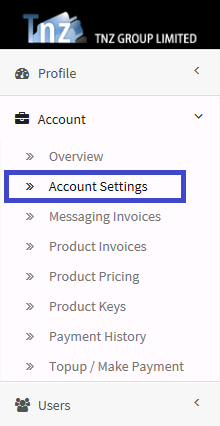
- Select Account | Account Settings
- Click Edit/Modify
- Locate the Invoicing Contact Email field
- Update the email contact address
- Click Update
Topics: Admin
Start your free trial today!
Ready to revolutionise your messaging?
Connect with people anywhere - boost engagement, responses and conversations.
20 credits over 14-days. No obligation. No credit card required.