









REST API Docs
WorkflowSMSEmailVoiceText-to-Speech (TTS)FaxWhatsAppRCSWebhooksAddress BookOpt-OutPartner APIAPIs, Libraries & SDKs
 REST API
 TypeScript
 SMPP
SMPP Python
 MCP
MCP .NET
.NET SMTP Gateway
 VBA
VBA Flexi API
 HTTPS API
 SOAP API
 Other Tools REST APITypeScriptSMPPPythonMCP.NETSMTP GatewayVBAFlexi APIHTTPS APISOAP APIOther Tools
 When sending SMS to Australian recipients, your business can choose to display a custom name, such as "MYBUSINESS", instead of a standard mobile number. This is known as an Alphanumeric Sender ID.
Due to strict anti-scam regulations introduced by the Australian Communications and Media Authority (ACMA), all Alphanumeric Sender IDs must be formally registered and linked to a verified Australian business entity.
This article outlines the requirements and the step-by-step process for securing your Sender ID through TNZ and the ACMA Assist portal.
An Alphanumeric Sender ID allows you to set your "From" name to a custom string of text. This increases brand recognition and trust, as the recipient sees your business name immediately upon receiving the message.
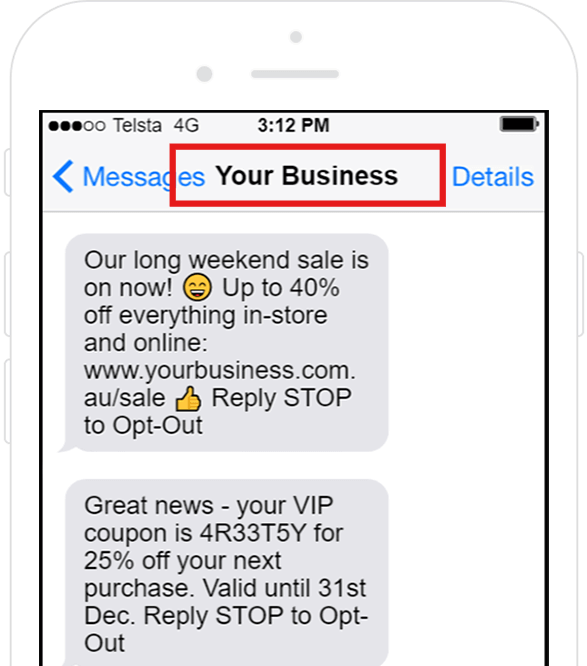
The Sender ID must have a clear link to your business — your legal name, trading name, registered trade mark or registered domain name.
Between 2 and 11 characters. Numbers (0–9), letters (A–Z) and common characters (! $ & + _ @) are allowed. Offensive words and restricted terms are banned.
TNZ must be authorised to send using your Sender ID. We'll handle the ACMA application for you. If you've already registered your ID through another provider, you can authorise TNZ as an additional sender.
One-way messaging only. Recipients cannot reply to an Alphanumeric Sender ID.
A business registered as "GW Pty Ltd", trading as "Good Widgets", with domain "widgetsonline.com.au" could use Sender IDs such as GW, Australia, GoodWidgets, Good_Widgets, WidgetsOnline or Widgets-Online.
Provide the following information to the TNZ Support or Account Management team. We'll then submit the application to the ACMA on your behalf.
| Requirement | Description |
|---|---|
| Sender ID | Your chosen Sender ID. You can register between 1 and 10 Sender IDs per request. |
| Business Name | Your legal entity name. Pty Ltd is typical, but eligibility isn't limited to companies. Individuals, partnerships, trusts, superannuation funds and government entities with an ABN can also register. |
| ABN or ABR | Your Australian Business Number (ABN) or Australian Business Register (ABR) details. |
| Business Address | The registered business address or your principal place of business. |
| Company Representative Full Name | The full name of an authorised person within your company to manage the approval. This person must be a primary contact or authorised user for the business in the Australian Business Register (see the ATO's guide), or invited to use ACMA Assist by an authorised user. |
| Company Representative Email | The email address associated with the authorised person. |
| Use Case | Explain the need for the Sender ID (for example, one-time passwords, urgent alerts, or appointment reminders). |
Once TNZ registers the ID, the ACMA will send an automated email to your nominated Company Representative.
The email contains a link: To proceed with registration of the sender ID, please go to... ← Click this link
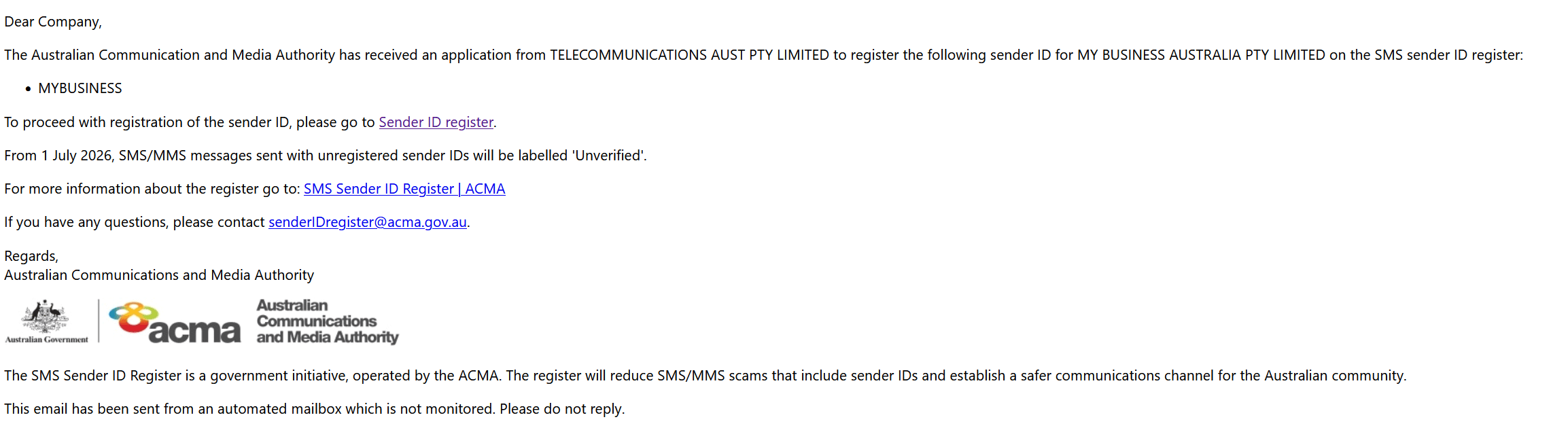
Clicking the link will open the ACMA Assist portal.
Once completed, the ACMA notifies TNZ, and we'll activate the Sender ID on your account.
![ACMA Assist - Confirm Registration of Sender ID [Markup]](https://cdn.tnz.co.nz/EmailLinks/TNZ/TNZ/Help/ACMA%20Assist%20-%20Confirm%20Registration%20of%20Sender%20ID%20%5BMarkup%5D.png)
If your business can't meet the ACMA registration requirements (for example, if you don't have an Australian ABN), or you need to receive replies, use a Virtual Mobile Number (VMN) instead.
Why was my Sender ID rejected?The most common reasons for rejection include a lack of clear relevance to the business (e.g. using "REMINDERS" instead of "MYBUSINESS"), or the representative failing to complete the ACMA Assist approval within the required timeframe. |
How long does the process take?Once the Company Representative approves the link in ACMA Assist, TNZ typically activates the Sender ID within 24 hours. |
What happens if I don't have an Australian Business Number (ABN)?TNZ is an originating telecommunications provider, so there are additional steps required to register a Sender ID for a non-Australian business. If you don't have an ABN, get in touch. An alternative is using a Virtual Mobile Number, which work without ACMA registration and support replies. |
I've already registered my Sender ID elsewhere. Do I need to do it again with TNZ?No. The SMS Sender ID Register is centralised. You won't need to re-register your Sender ID, and there's nothing to port. You will need to authorise TNZ as an additional telecommunications provider for your Sender ID. Get in touch and we'll walk you through the process. |
Are there fees for registration?At the moment, there are no fees for registering Sender IDs. The ACMA has the right to charge in future, so this may change. |
What does "Unverified" mean in practice?From 1 July 2026, if you send an SMS using a Sender ID that isn't on the ACMA Register, terminating carriers replace your Sender ID with the word "Unverified" on the recipient's phone. The message still arrives, but your branding is gone, and recipients are more likely to ignore or distrust it. |
Does the government agency exemption apply to me?A government agency (Commonwealth, state, territory, or a corporation it controls) can use a Sender ID that doesn't match its registered name, but only when the message relates to an emergency, or a matter of public health, safety or security. If this applies, provide TNZ with evidence explaining why the alternative Sender ID is appropriate for the use case. |
The full rules are set out in the Telecommunications (SMS Sender ID Register) Industry Standard 2025.
Topics: SMS
Ready to revolutionise your messaging?
Connect with people anywhere - boost engagement, responses and conversations.
20 credits over 14-days. No obligation. No credit card required.